10 Wild Use Cases for Seedream 4.0 "Sequence Mode"
Discover 10 innovative use cases for Seedream 4.0's "Sequence Mode," the groundbreaking AI image generation tool from ByteDance. Learn how creative professionals can leverage this feature for multi-character game asset creation, dynamic marketing campaigns, immersive world-building, and more. Explore how Seedream 4.0 helps maintain character consistency, streamline workflows, and enhance visual storytelling across various industries.
10 Wild Use Cases for Seedream 4.0 "Sequence Mode"
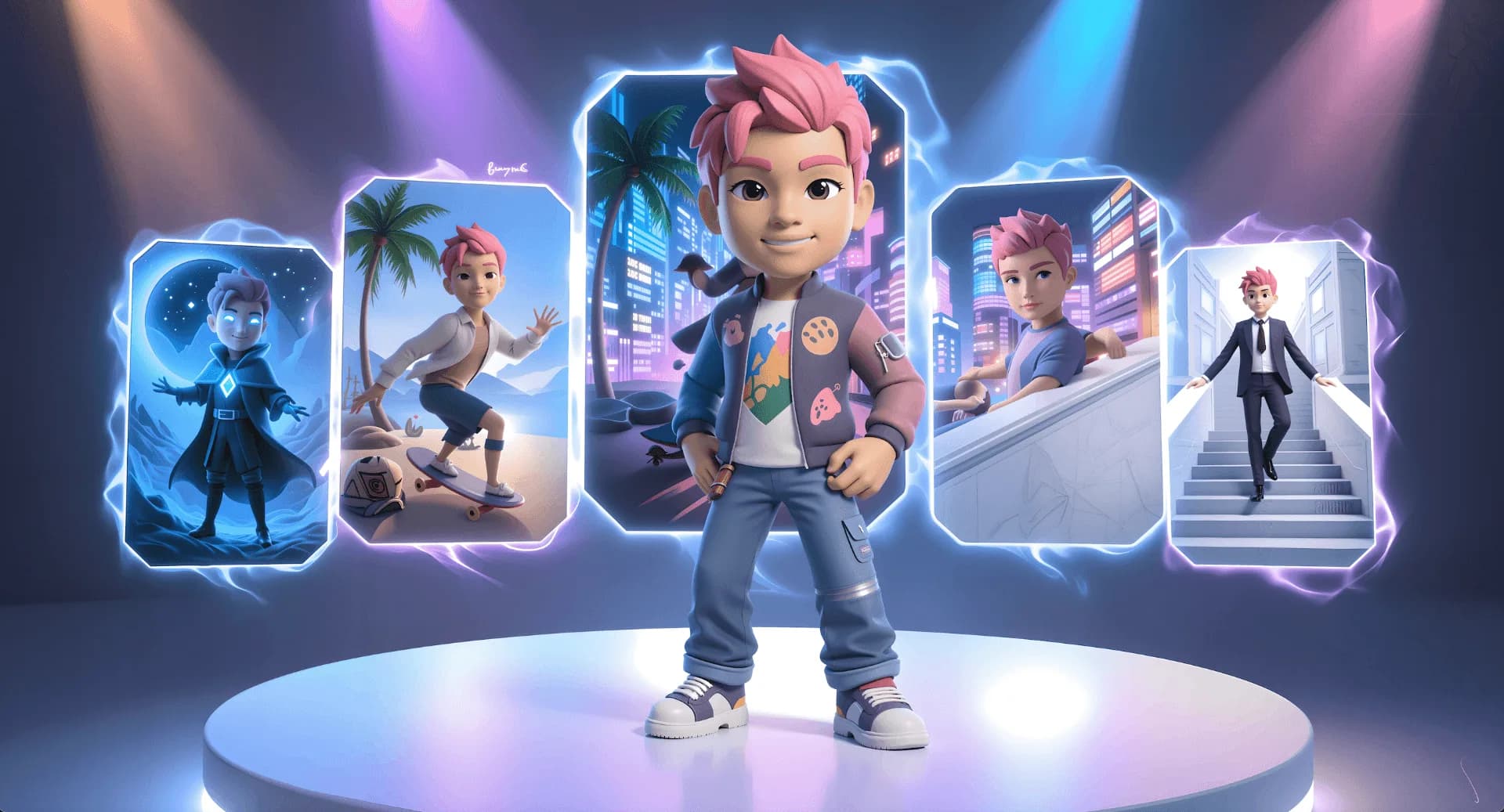
Seedream 4.0, ByteDance's revolutionary AI image generation model, is transforming how creatives work across industries. With its unified text-to-image synthesis, reference-based editing, and batch image creation capabilities, Seedream 4.0 on Scenario opens up unprecedented possibilities for creative professionals.
The game-changing "Sequence Mode" is where Seedream 4.0 truly shines – this revolutionary feature creates entire image series from a single prompt. By handling up to 10 reference images and outputting up to 15 matching images simultaneously, it ensures perfect consistency in characters and styles across complete visual narratives.
In this article, we'll explore 10 extraordinary ways creative professionals or game developers can leverage Seedream 4.0's revolutionary "Sequence Mode" to dramatically accelerate their workflows. From maintaining character consistency to executing complex scene transformations, these use cases showcase how Seedream 4.0 is redefining creative possibilities.
1. Multi-Character Game Asset Creation
Game developers can dramatically accelerate character asset creation by using Seedream 4.0's sequence mode to generate consistent character designs across multiple poses, outfits, and environments.
- Input Setup: Upload 1-3 reference images of your base character concept art.
- Prompt Example: "Generate a sequence of 6 images showing this fantasy warrior character in different battle poses: casting a fire spell, dodging an arrow, climbing a wall, and wounded but fighting, resting on a throne, and walking in a medieval village. Maintain exact same armor design, facial features, and art style across all images."
- Technical Settings: Enable Sequence Mode with Max Image Count set to 6
- Output: Six consistent character poses & situations, ready for animation or game implementation.
This approach enables game studios to rapidly prototype character animations and test various poses or scenes, while maintaining absolute design consistency—a task that traditionally requires days of manual illustration.
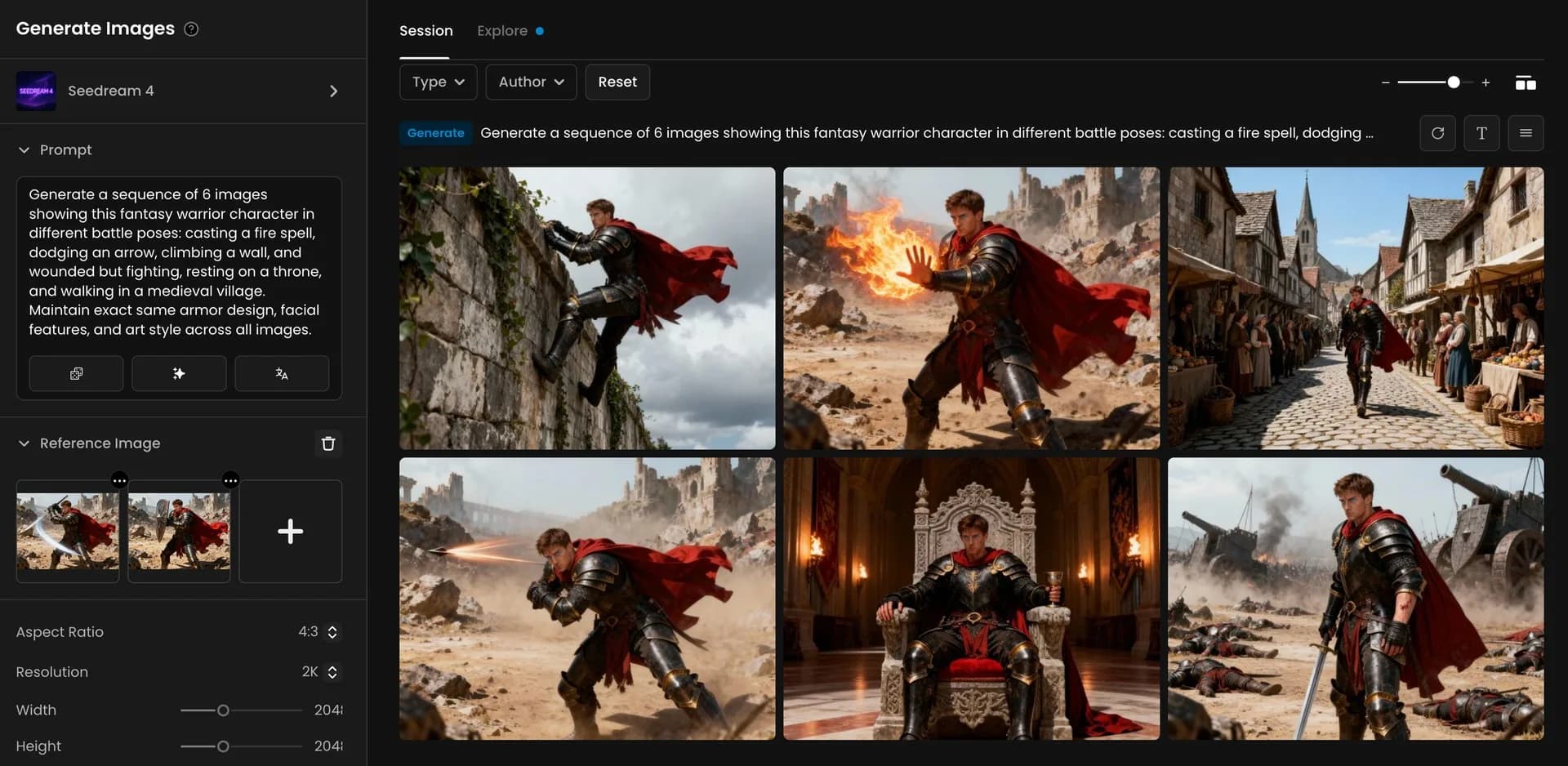
Fantasy warrior in battle poses and medieval scenes.
2. Dynamic Marketing Campaign Generation with Style Transformation
Marketing teams can create comprehensive multi-platform campaigns by leveraging Seedream 4.0's style transformation capabilities while preserving brand consistency.
- Input Setup: Upload your product photo and brand logo as reference images.
- Prompt Example: "Create a sequence of 5 marketing visuals for this (product), each adapted for different platforms: 1) Instagram post with lifestyle setting showing young professionals, 2) LinkedIn banner with business context, 3) Twitter header with minimalist approach, 4) YouTube thumbnail with dramatic lighting, 5) Facebook ad with family setting. Maintain brand colors and logo placement across all variations."
- Technical Settings: Sequence Mode enabled, various aspect ratios for different platforms, 2K resolution.
- Output: A complete marketing package with platform-optimized visuals that maintain brand identity.
This workflow saves marketing teams weeks of planning and production, allowing them to test multiple campaign approaches simultaneously before committing to a direction.
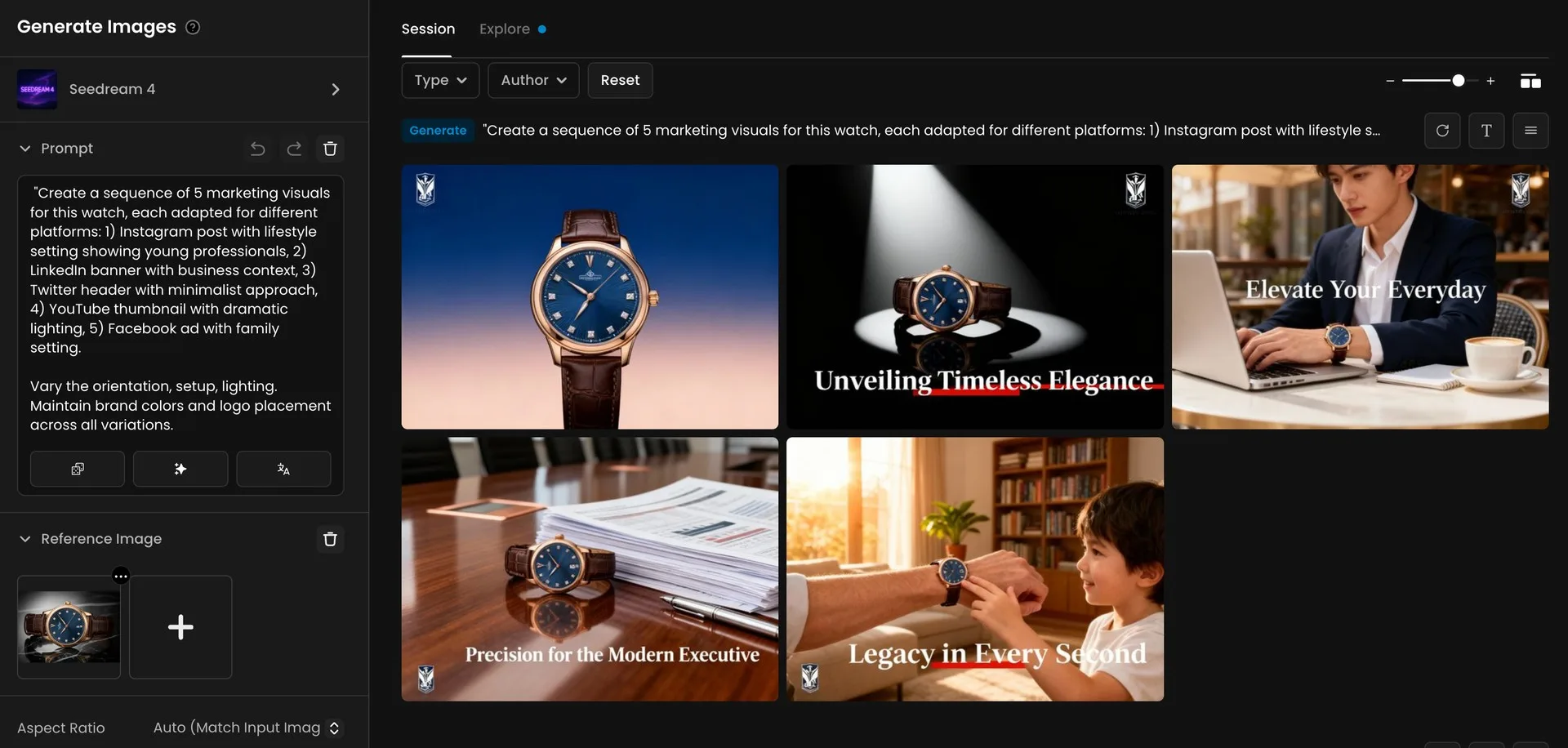
Five marketing visuals for a luxury watch brand.
3. Immersive World-Building with Environmental Variations
Architects, designers and concept artists can quickly create comprehensive worlds by generating environmental variations from a single location concept.
- Input Setup: Upload your base environment concept art.
- Prompt Example: "Generate a sequence showing this modern forest villa with floor-to-ceiling windows under 8 different conditions: dawn with gentle morning mist filtering through trees, bright midday with sunlight dappling through forest canopy, golden hour with warm light illuminating the white façade, twilight with interior lights glowing against darkening forest, stormy weather with rain streaming down the glass windows, winter with light snow dusting the geometric rooflines, autumn with colorful leaves contrasting the minimalist architecture, and an elegant evening gathering with guests and ambient lighting. Maintain the clean lines, cantilevered terraces, and architectural details throughout."
- Technical Settings: Sequence Mode with Max Image Count set to 8, 16:9 aspect ratio, 2K resolution.
- Output: Eight variations of the same architectural space under different conditions, perfect for comprehensive environment documentation.
This approach allows designers to preview how their environments will appear across different scenarios without manually creating each variation—significantly streamlining the art direction process.
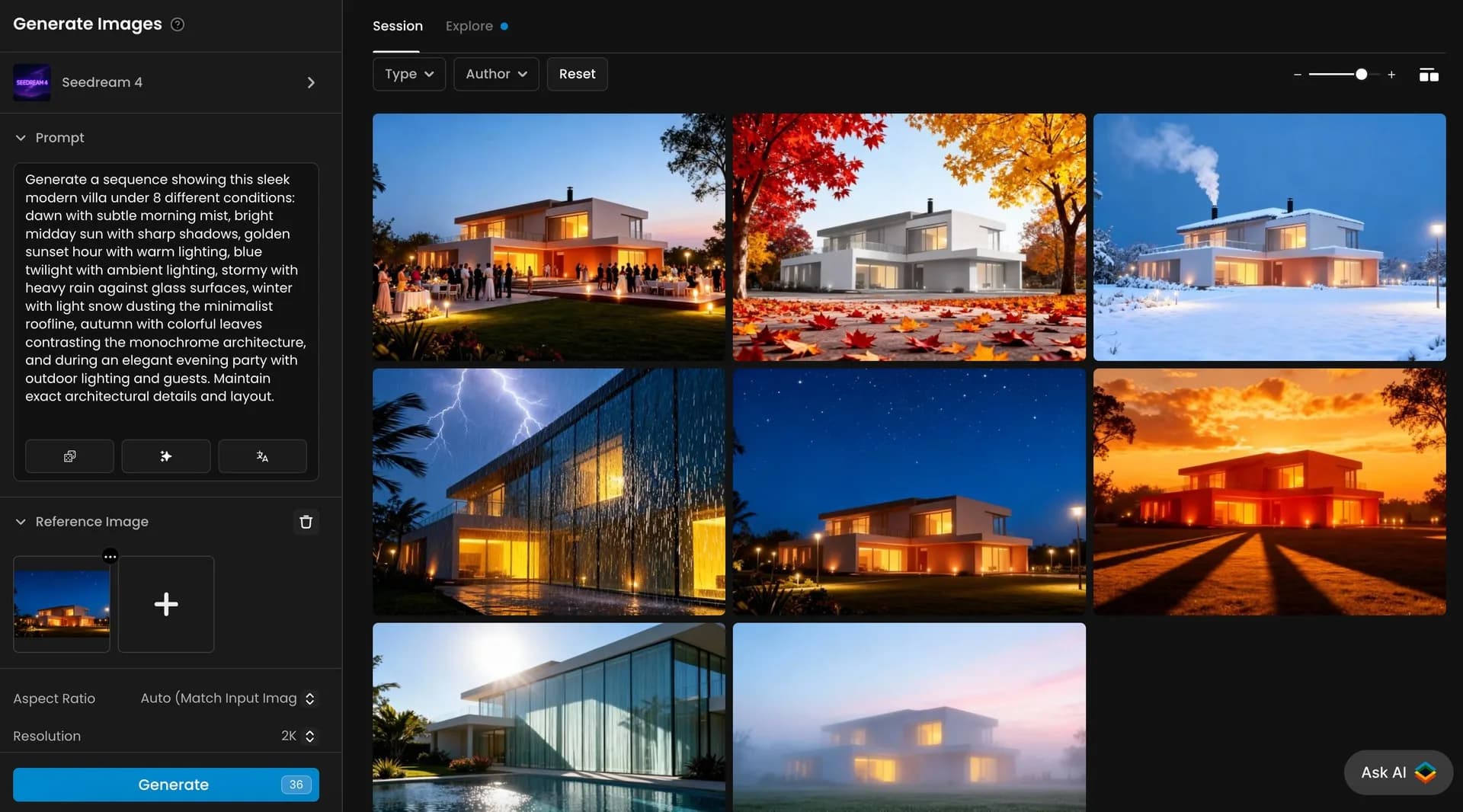
Modern villa shown in eight weather and lighting scenes.
4. Advanced Character Identity Preservation Across Art Styles
Artists and game studios can transform characters across radically different art styles while maintaining core identity—perfect for game remasters or stylistic experiments.
- Input Setup: Upload 3-5 reference images of your character from different angles.
- Prompt Example: "Transform this character into 6 different art styles while preserving exact facial features, body proportions, and key costume elements: 1) pixel art suitable for 16-bit game, 2) watercolor illustration, 3) comic book cover with dramatic lighting, 4) 3D rendered model, 5) anime style with cel shading, 6) photorealistic cinematic style."
- Technical Settings: Sequence Mode enabled, 1:1 aspect ratio, 2K resolution.
- Output: Six stylistically diverse but instantly recognizable versions of the same character.
This capability allows creative teams to experiment with how their characters would translate across different media formats without commissioning multiple artists.

Character transformed into six unique artistic styles.
5. Seamless Product Integration in Complex Environments
Product designers and marketers can visualize products in elaborate real-world contexts, creating convincing integration that highlights functionality.
- Input Setup: Upload your sneaker render or photo as the primary reference.
- Prompt Example: "Create a sequence showing this sneaker being used in 5 different urban environments: narrow European cobblestone street with historic buildings, busy Asian metropolis with skyscrapers, California beach boardwalk with palm trees, snowy Canadian city with winter conditions, and Amsterdam canal with bridges. Show the product being naturally used by appropriate wearers in each setting. Maintain perfect product details across all images."
- Technical Settings: Sequence Mode enabled, 16:9 aspect ratio, 2K resolution.
- Output: Five contextual product visualizations showing authentic use cases in different environments.
This technique allows product teams to create compelling marketing materials that demonstrate versatility across different user scenarios—without expensive photo shoots in multiple locations.
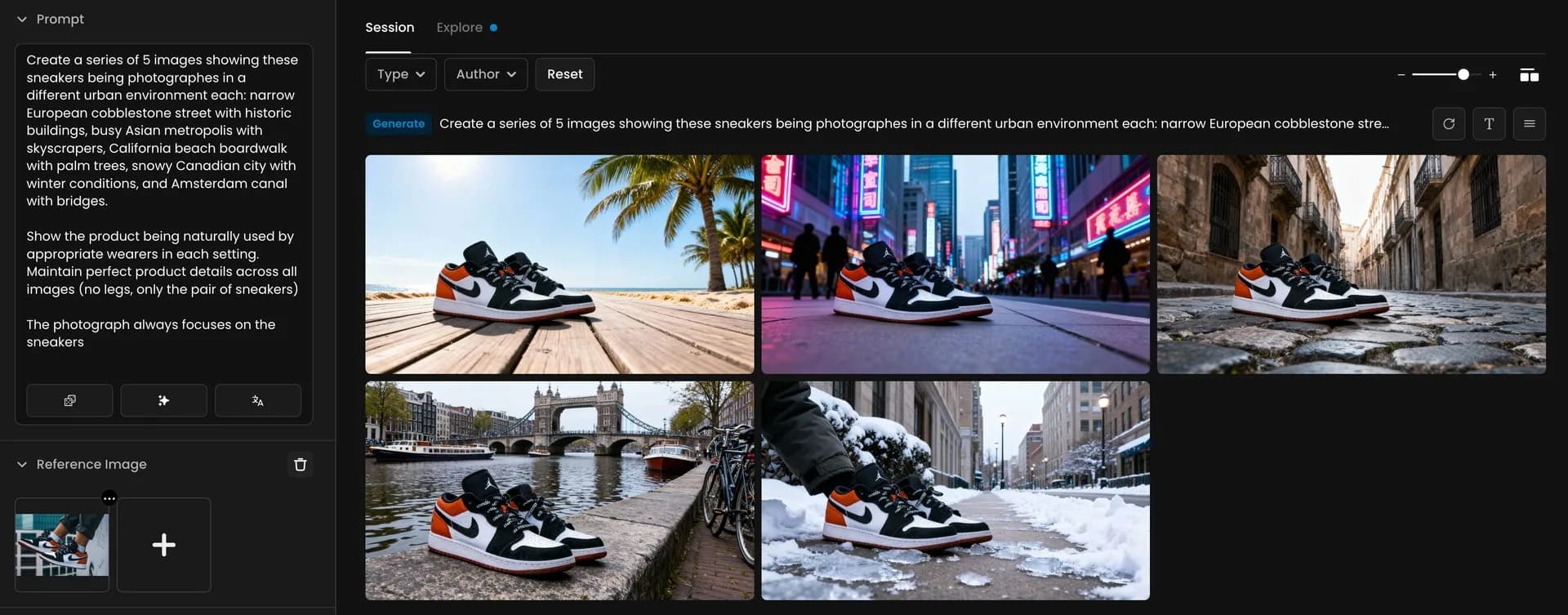
Sneakers showcased in diverse global urban environments.
Let's also explore how Seedream 4.0 can help with consistent product visualization using a "red jacket" as our example:
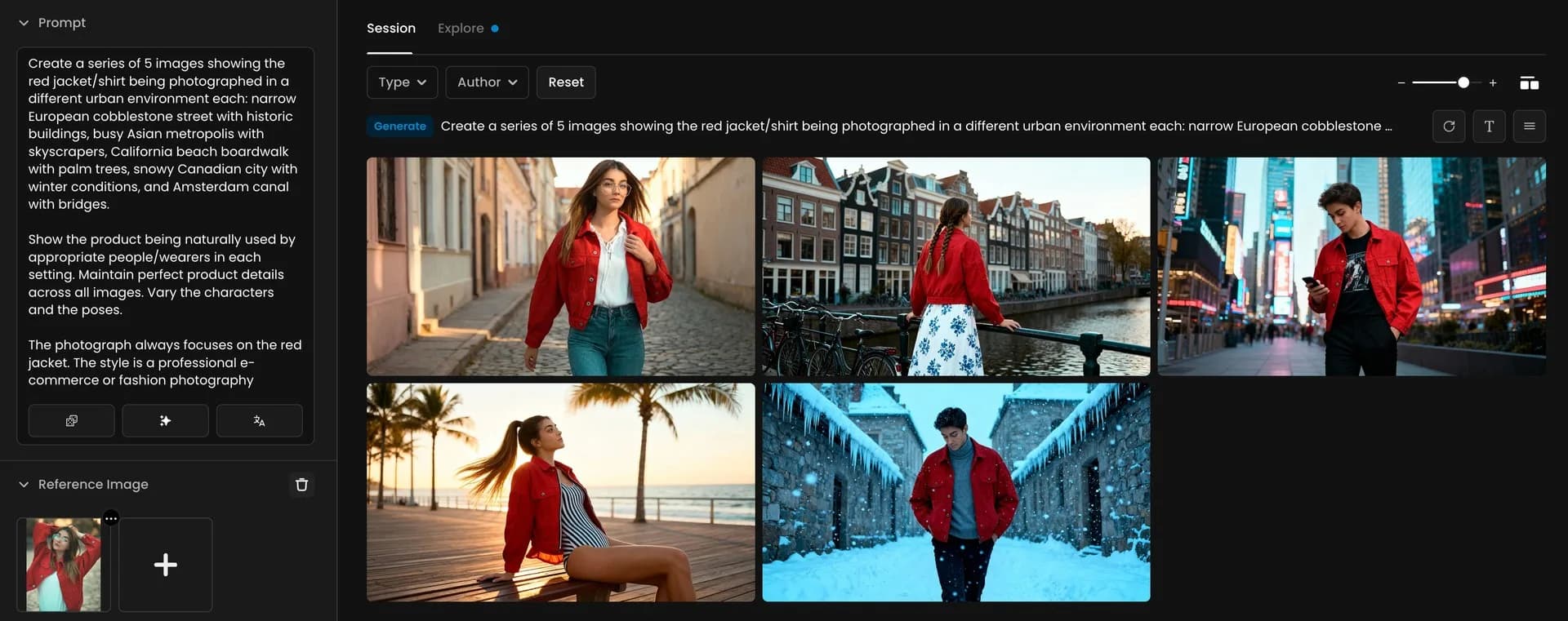
Red jacket styled in five unique urban locations.
6. Interactive Narrative Storyboarding
Game designers and filmmakers can rapidly visualize branching narrative possibilities by generating multiple scene outcomes from a single starting point.
- Input Setup: Upload a reference image of your scene's starting point showing the cartoon blue king and cartoon red king.
- Prompt Example: "Generate a sequence showing 4 different scenarios with just the cartoon blue king and cartoon red king: 1) kings shaking hands and forming an alliance, 2) kings playing chess together in the throne room, 3) kings sharing a royal feast at a banquet table, 4) kings standing back-to-back defending the castle from invaders. Maintain character designs, bright cartoon aesthetic, and simple backgrounds across all variations."
- Technical Settings: Sequence Mode enabled, 16:9 cinematic aspect ratio, 2K resolution.
- Output: Four narrative possibilities flowing from the same starting point, perfect for discussing storytelling options with teams.
This approach enables narrative designers to visualize multiple story branches simultaneously, facilitating more effective decision-making during story development.
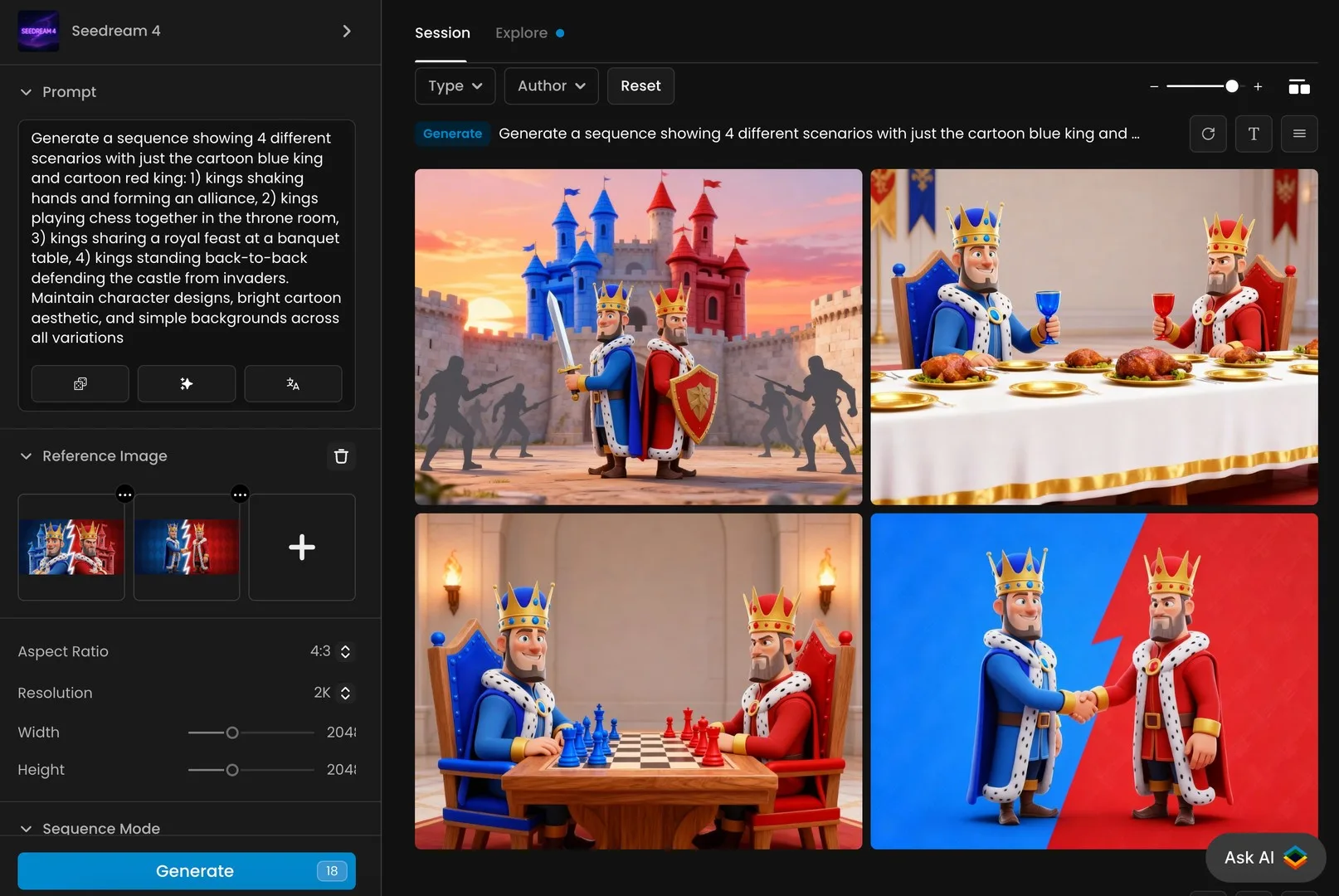
Cartoon blue and red kings in four unique scenes.
7. Dynamic Character Aging and Evolution Sequences
Game developers and storytellers can visualize character evolution over time, showing aging, injury, corruption, or transformation while maintaining core identity.
- Input Setup: Upload 1 reference images of your character.
- Prompt Example: "Create a sequence showing this character at 4 different life stages: 1) as a young child with playful expression and casual clothes, 2) current teenage form, 3) as a mature 50-year-old with confident posture and professional attire, 4) as an 80-year-old elder with weathered features but familiar eyes. Maintain consistent facial structure, distinctive features, and appropriate background settings for each life stage."
- Technical Settings: Sequence Mode enabled, 16:9 portrait aspect ratio, 2K resolution.
- Output: Four-stage character evolution showing consistent aging progression.
This capability allows designers to create compelling character arcs with visual consistency that would traditionally require extensive concept art development.
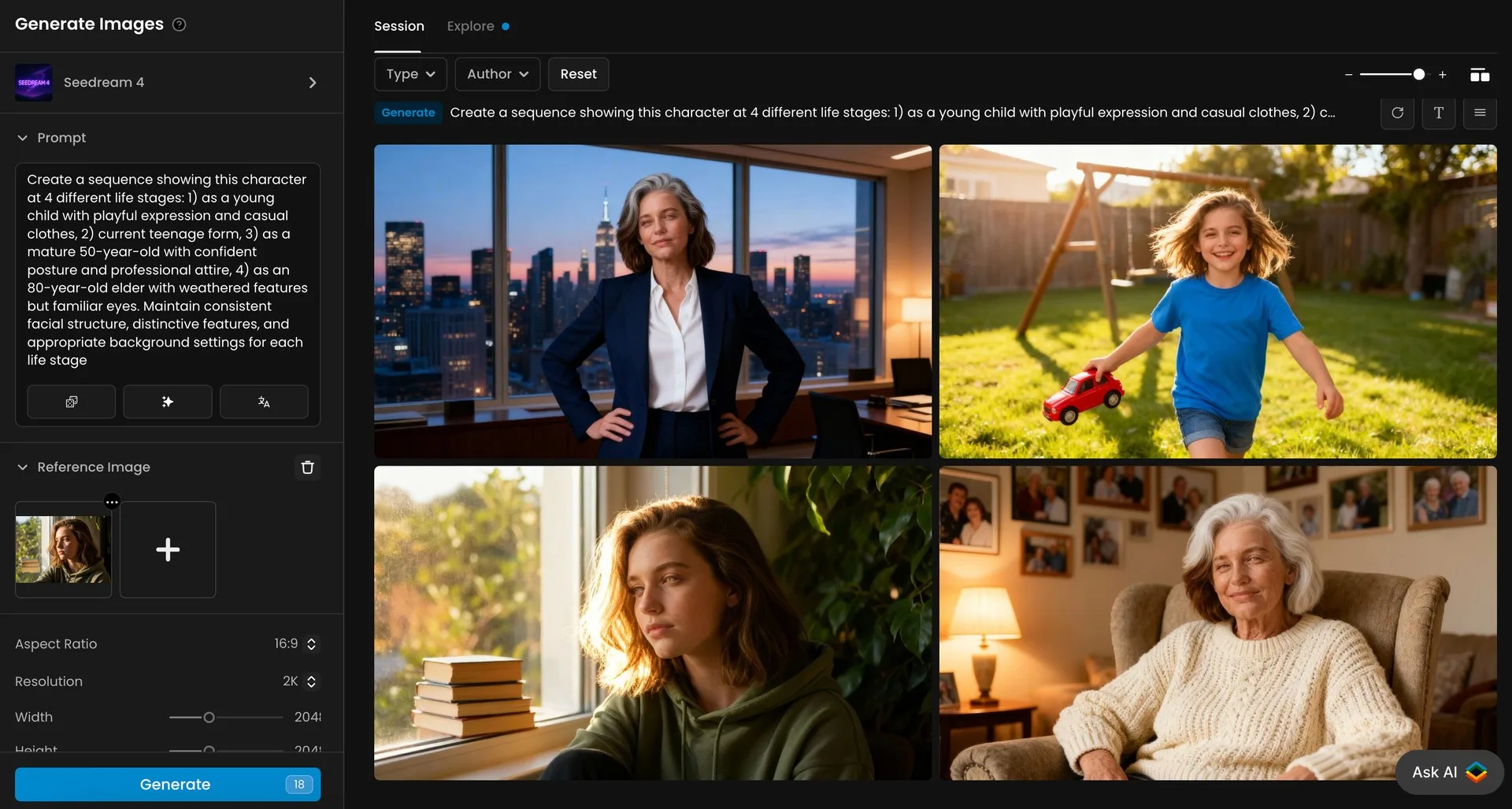
Character at four life stages from child to elder.
8. Advanced Costume Design Iteration
Character designers can explore multiple costume variations simultaneously while maintaining perfect character identity and proportions.
- Input Setup: Upload your character with base costume.
- Prompt Example: "Generate a sequence showing this exact same character wearing 6 different costume variations: 1) battle-damaged version with torn fabric and dented armor, 2) formal ceremonial version with ornate decorations, 3) lightweight stealth version in dark colors, 4) winter adaptation with fur-lined elements, 5) desert adaptation with lighter fabrics and head coverings, 6) royal/elite version with precious materials. Maintain exact same body proportions, facial features, and pose across all variations."
- Technical Settings: Sequence Mode enabled, 16:9 aspect ratio, 2K resolution.
- Output: Six costume variations with perfect character consistency.
This technique allows character designers to rapidly prototype different costume options for various game scenarios, saving weeks of manual illustration time.
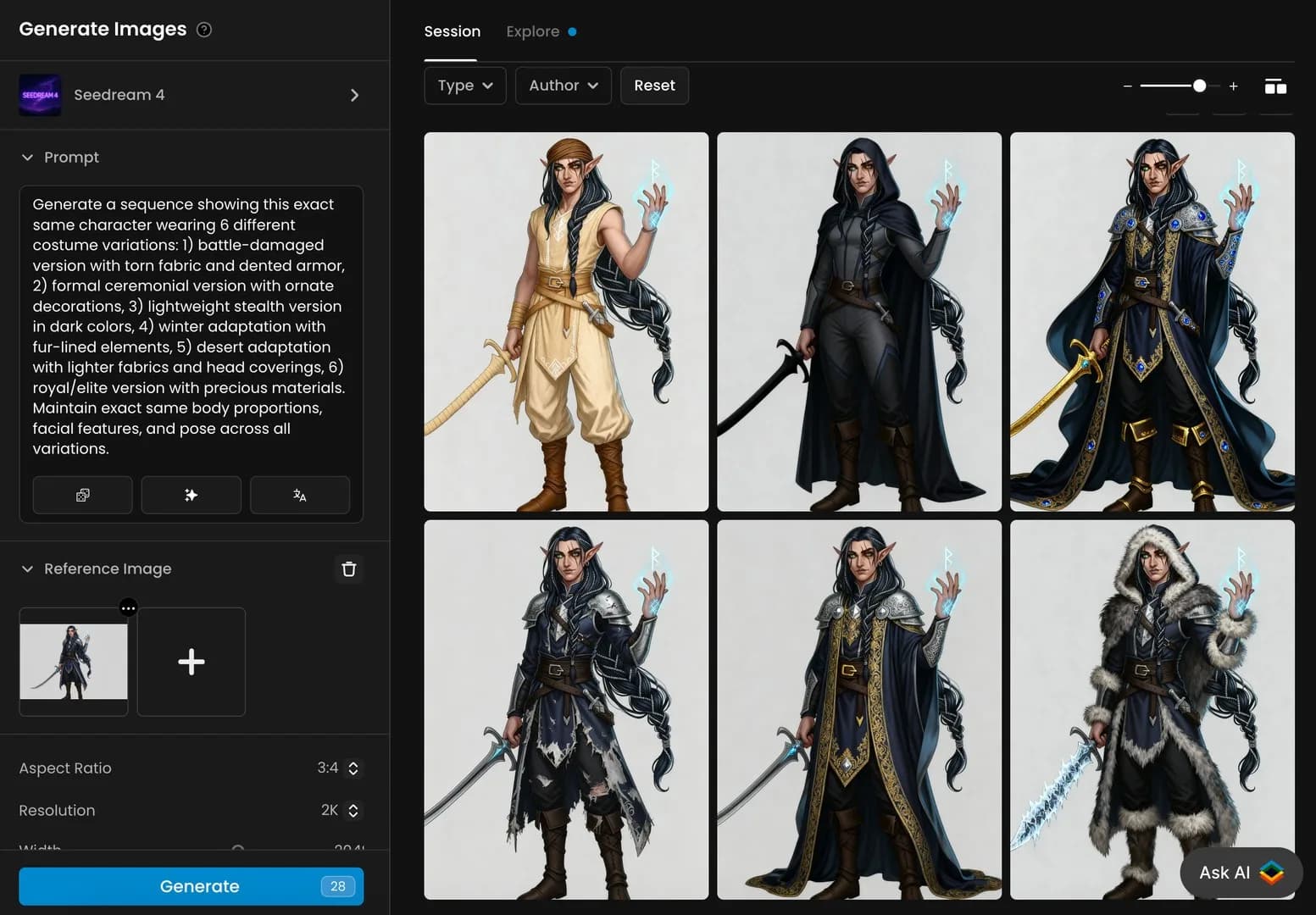
Elf character in six unique fantasy costumes.
9. Cinematic Scene Lighting Exploration
Cinematographers and game lighting artists can rapidly test different lighting approaches for the same scene.
- Input Setup: Upload your base scene.
- Prompt Example: "Create a sequence showing this exact same scene under 7 different lighting conditions: 1) dramatic noir with strong directional shadows, 2) warm sunset golden hour, 3) cool blue moonlight, 4) harsh mid-day sunlight, 5) atmospheric foggy diffusion, 6) cyberpunk with multiple colored light sources, 7) horror with single strong uplighting. Maintain all scene elements, character positions, and camera angle across all variations."
- Technical Settings: Sequence Mode enabled, 16:9 cinematic aspect ratio, 2K resolution.
- Output: Seven lighting studies of the same scene.
This capability allows directors and lighting artists to experiment with emotional tone through lighting without rendering multiple versions in 3D software.
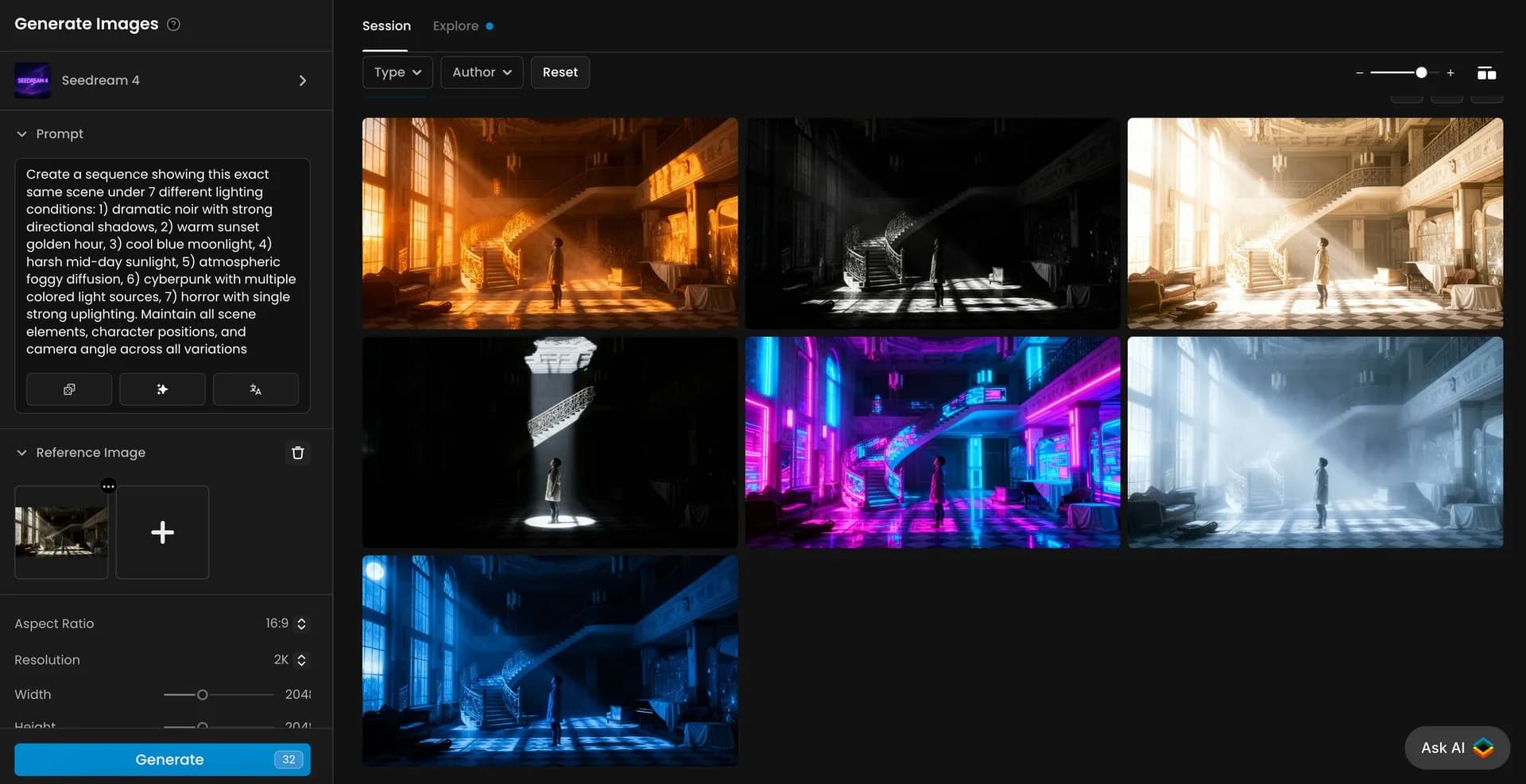
Seven lighting styles applied to the same interior scene.
10. Rapid UI/UX Mockup Generation and Testing
UI/UX designers can quickly visualize how interfaces would appear across multiple devices and contexts.
- Input Setup: Upload your basic UI design mockup.
- Prompt Example: "Generate a sequence showing this app interface being used in 4 specific contexts: 1) smartphone in portrait mode held by a commuter on a subway train, 2) tablet in landscape orientation used by a business professional during a client meeting, 3) desktop monitor in a modern office workspace, 4) smart TV interface viewed from a living room couch"
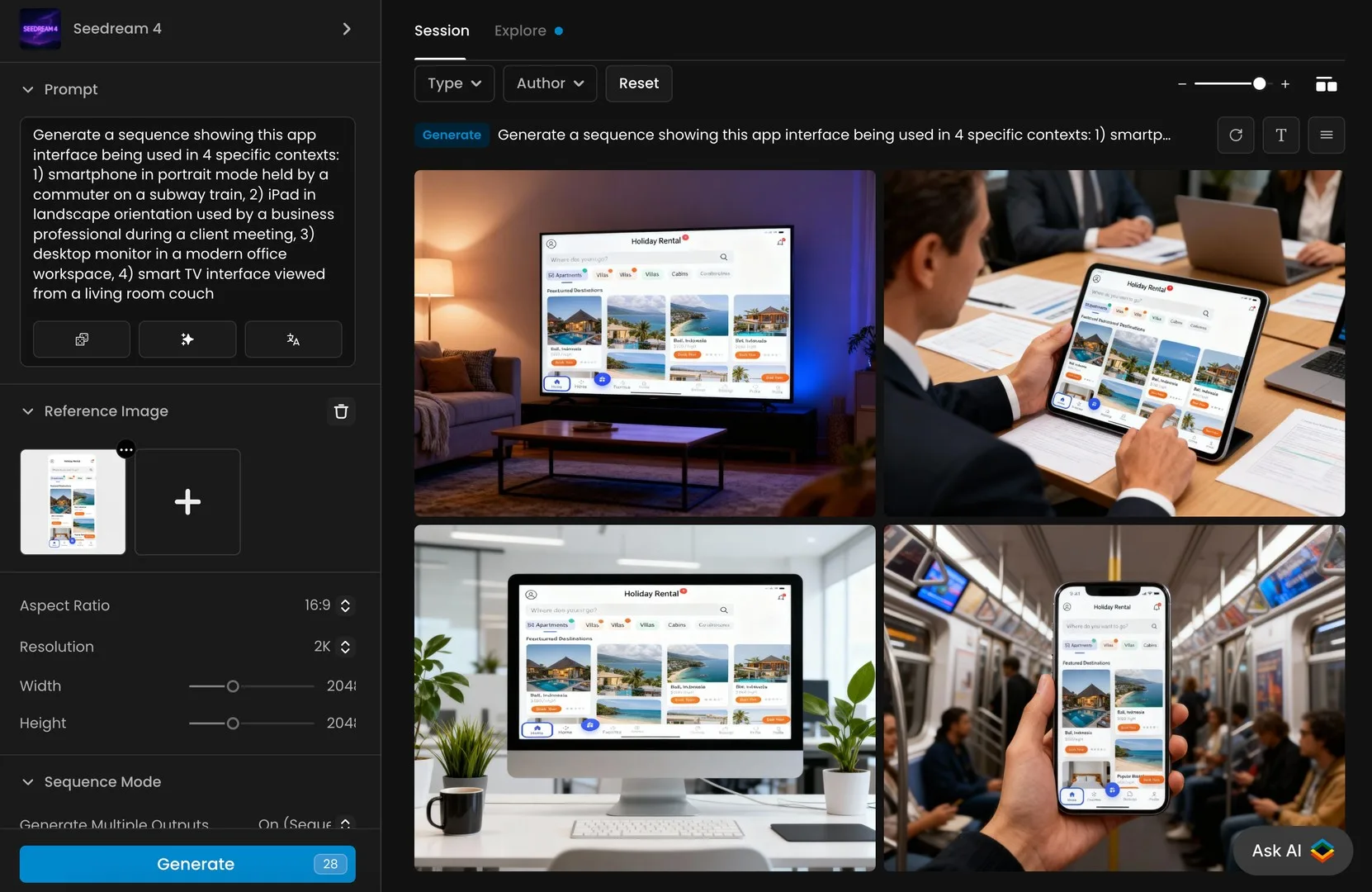
App interface displayed across multiple devices in daily life.
Conclusion: Unlock Your Creative Potential with Seedream 4.0 on Scenario
Seedream 4.0's Sequence Mode represents a significant advancement in AI image generation technology, offering unprecedented control and consistency across multiple images. The use cases outlined above demonstrate how this powerful tool can transform workflows across industries—from character design and storytelling to product visualization and UI/UX design.
By leveraging Seedream 4.0's capabilities, creative professionals can:
- Save countless hours on repetitive design tasks
- Maintain perfect consistency across image sequences
- Explore multiple creative directions simultaneously
- Create high-quality visual assets without specialized technical skills
Ready to experience the power of Seedream 4.0's Sequence Mode for yourself? Start creating your own image sequences today on Scenario's platform. With an intuitive interface and powerful AI capabilities, you'll be generating professional-quality image sequences in minutes.