ScenarioExplorations Edit one thing, keep the rest

Three image models. Two pictures. One rule

Edit one thing, keep the rest.

The rest of the picture
is the part you already approved.

We asked three image models to change one detail and leave everything else alone. Then we looked very closely at what came back.

01 · The lantern shop

Four small edits, one at a time.

Each edit started from the same original. Same picture and the same instruction for every model.

Edit 1

Make only the middle lantern red.
  • All three turned it red.
  • Gemini also turned the jars below it red.

Edit 2

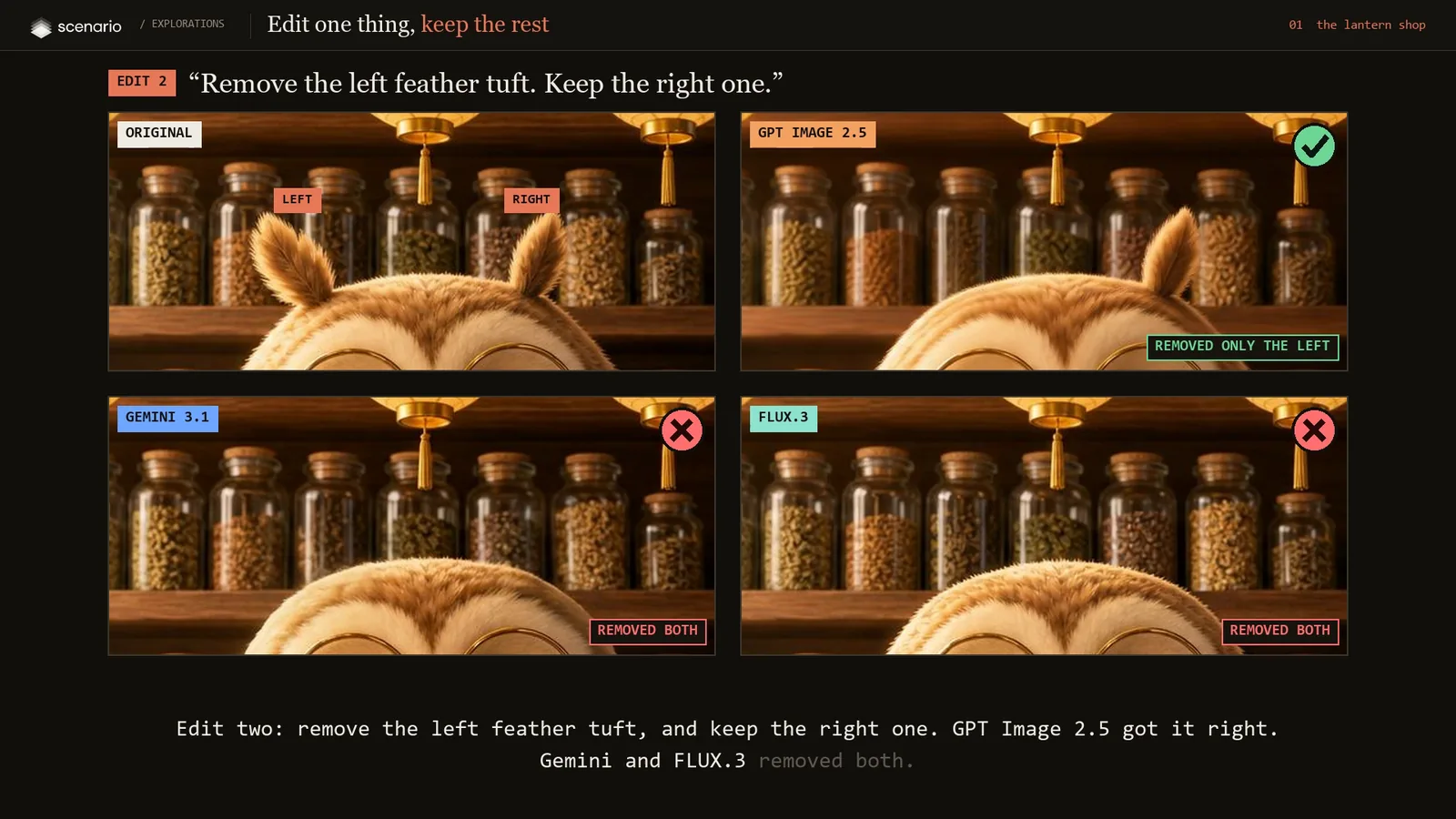
Remove the left feather tuft. Keep the right one.
  • GPT Image 2.5 removed only the left.
  • Gemini and FLUX.3 removed both.

Edit 3

Change the sign from MOSSLY to FERNLY.
  • All three got it right.

Edit 4

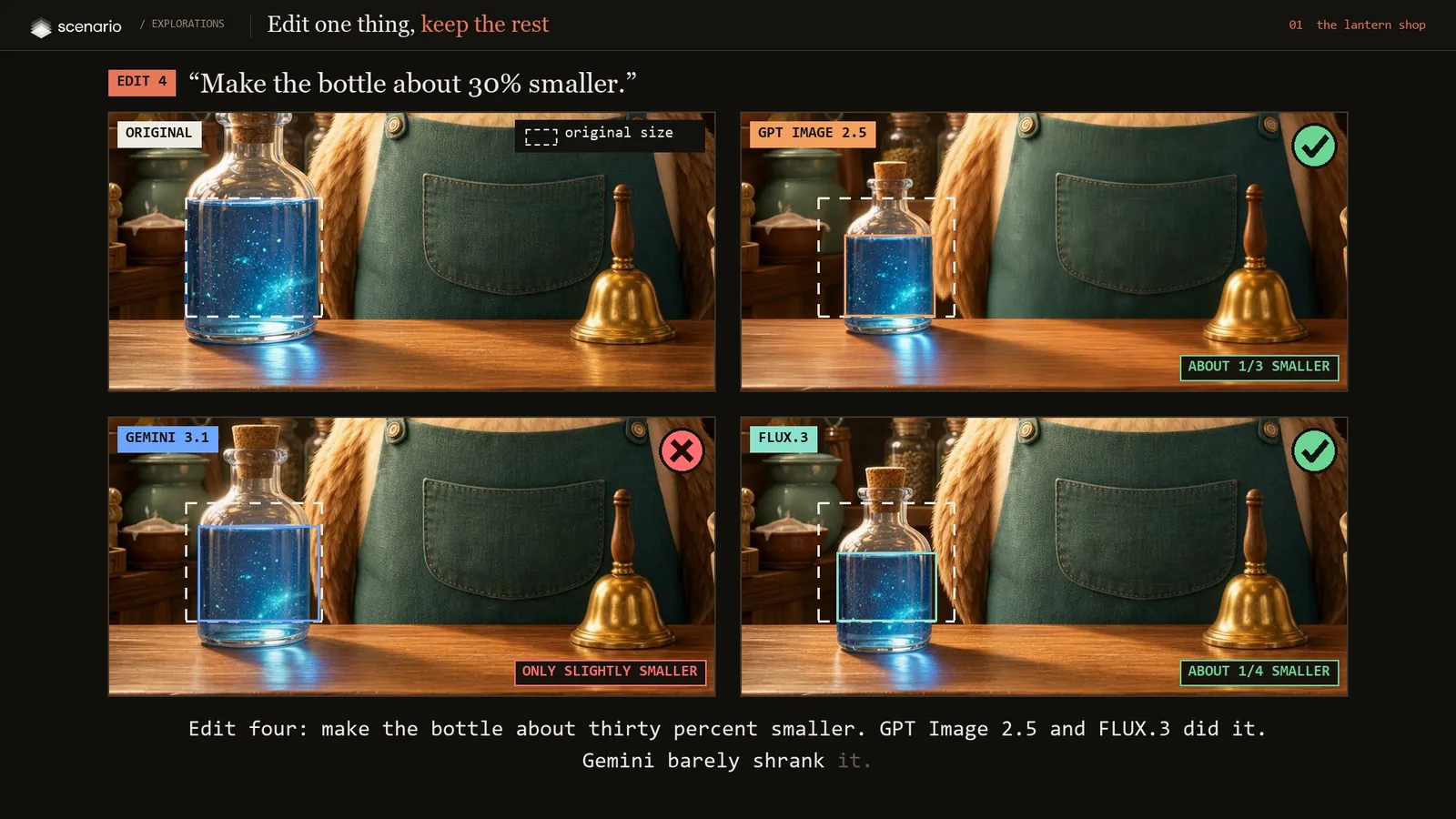
Make the bottle about 30% smaller.
  • GPT Image 2.5 about a third smaller, FLUX.3 about a quarter.
  • Gemini only slightly smaller.
The feather edit: the original with LEFT and RIGHT tufts labelled. GPT Image 2.5 removed only the left tuft; Gemini and FLUX.3 removed both.
The pair test. Removing one of two matching things is where models slip.
The bottle edit, with a dashed outline of the original size drawn on every result.
The dashed box is the original size, drawn on every result.

Then the question that matters most: what changed that nobody asked for?
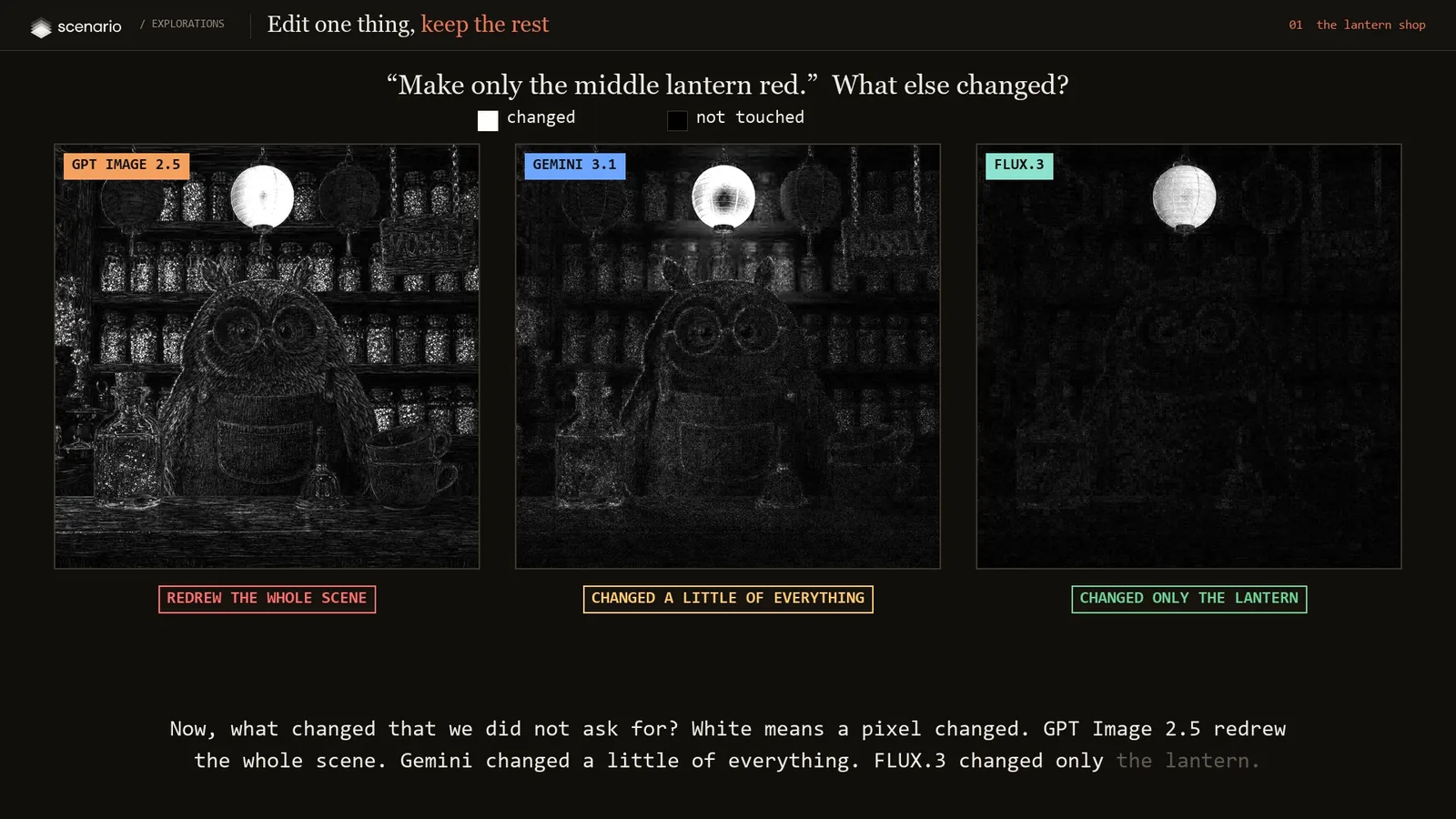
Change maps after the lantern edit. White means a pixel changed. GPT Image 2.5 lights up across the whole scene, Gemini a little everywhere, FLUX.3 only the lantern.
White means a pixel changed. Only the lantern should light up.
ModelEdits rightEverything else
GPT Image 2.54 of 4Redrawn
Gemini 3.12 of 4Partly changed
FLUX.33 of 4Untouched

02 · The portrait

Nine edits, each on top of the last.

Lipstick, eyeliner, green eyes, an earring, a necklace, a deeper skin tone, copper hair, a hair clip and a burgundy dress. Every step started from the step before, the way real retouching works, so small damage adds up.
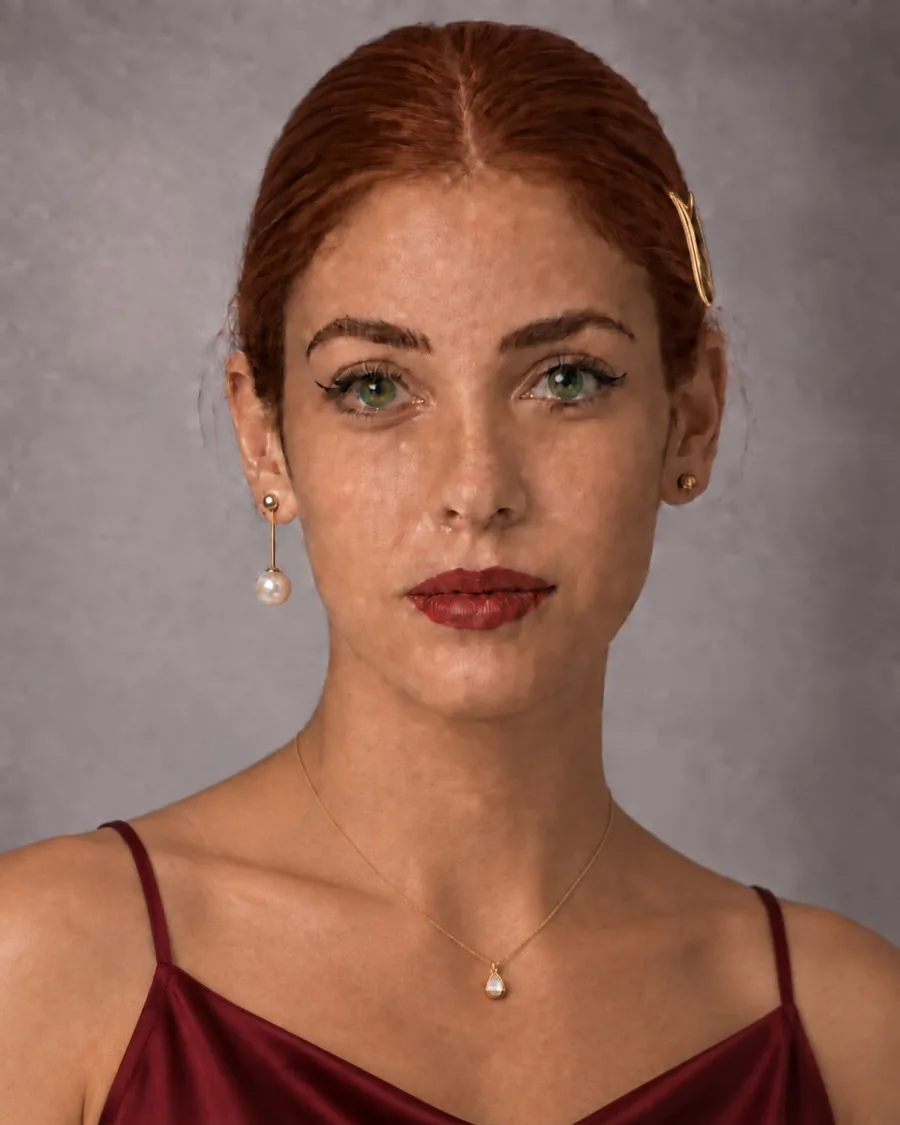
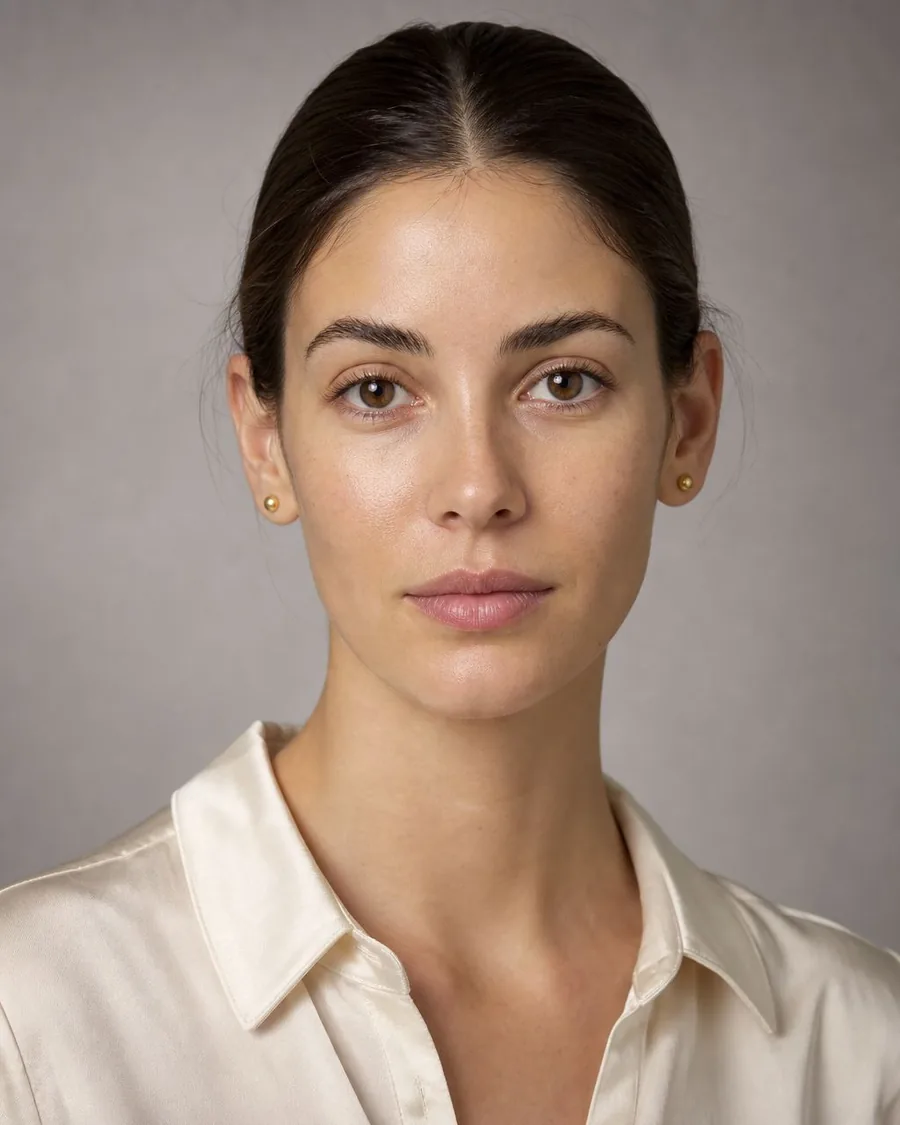
GPT Image 2.5 after nine edits
The original portrait
OriginalGPT Image 2.5 · after 9 edits

Look at the cheek: pale patches after nine edits.
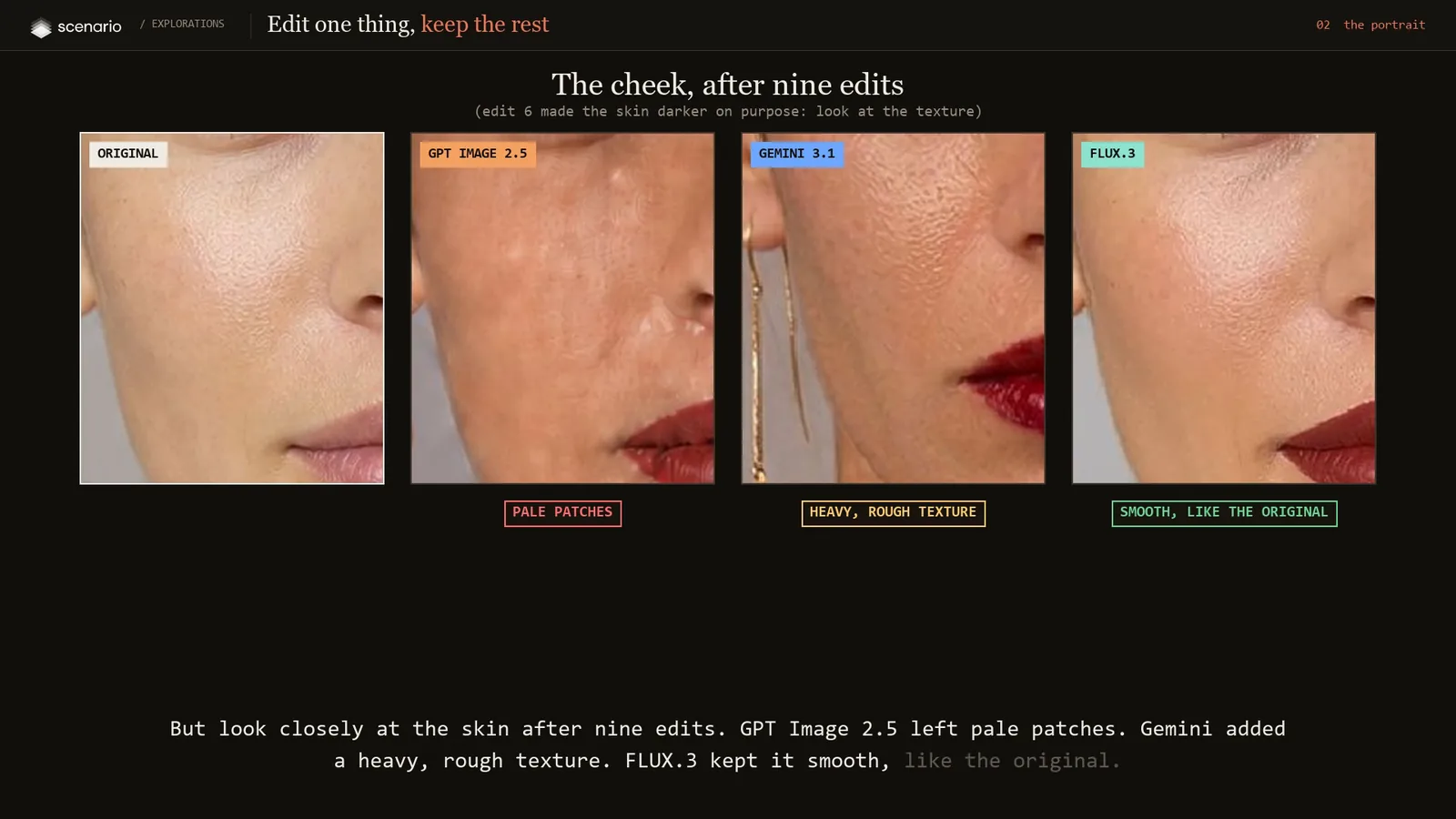
Cheek close-ups after nine edits: original, GPT Image 2.5 with pale patches, Gemini with heavy rough texture, FLUX.3 smooth like the original.
The skin test. Edit 6 darkened the tone on purpose, so look at the texture.
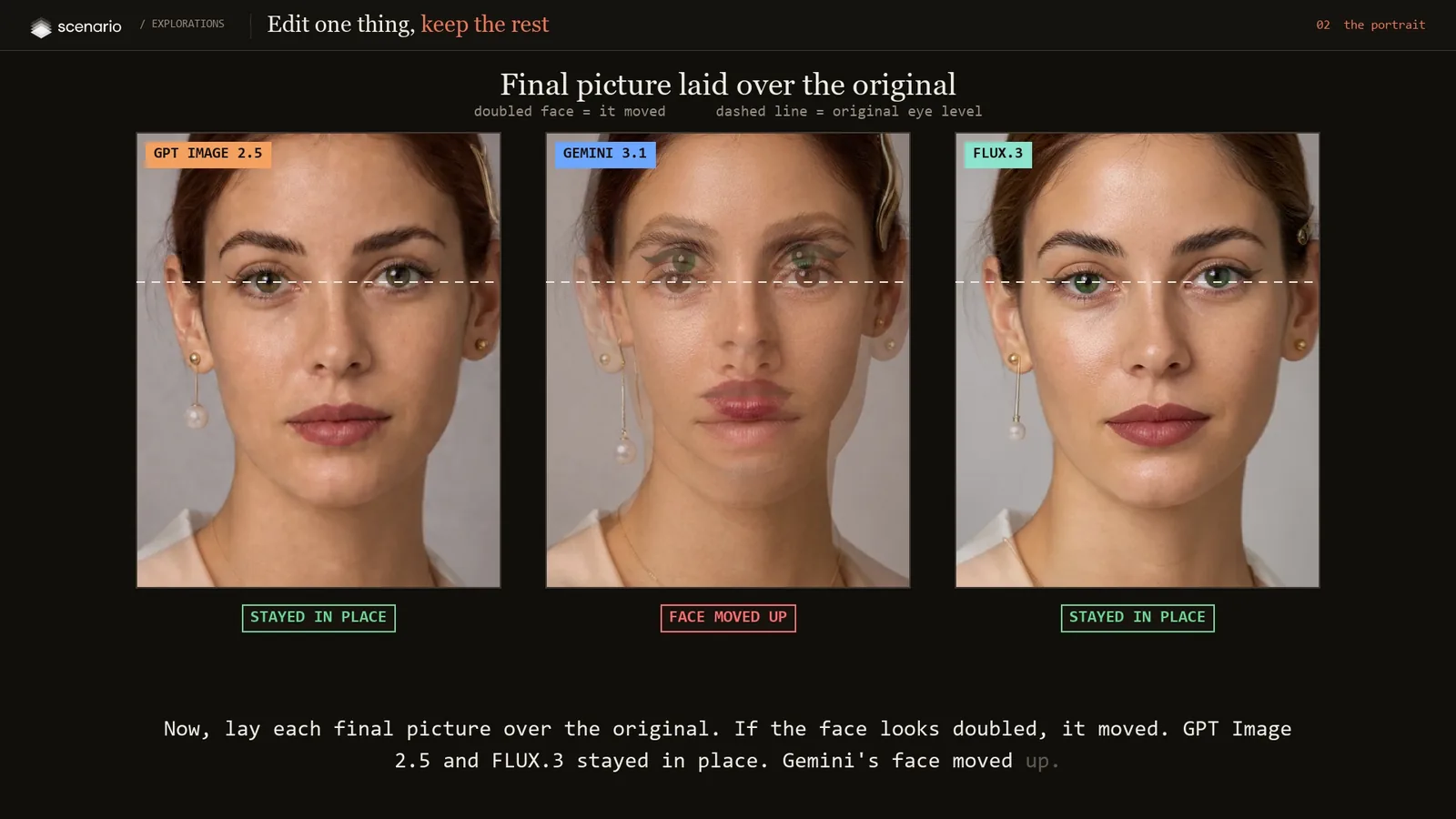
Each final picture laid over the original at half opacity. Gemini's face appears doubled because it moved up; GPT Image 2.5 and FLUX.3 line up.
The overlay test. A doubled face means the face moved.
ModelEdits doneSkinFace position
GPT Image 2.59 of 9Pale patchesStayed
Gemini 3.19 of 9Rough textureMoved up
FLUX.39 of 9CleanStayed

What we took away

Two strengths, and you choose.

GPT Image 2.5

Made every edit we asked for

Four of four in the shop and nine of nine on the portrait, including the tricky feather. It redraws more of the picture, and after nine edits the skin turned patchy.

FLUX.3

Changed the least of everything else

In the change map only the lantern lit up. After nine edits it was still the same clean photo, in the same place. It missed the feather.

When the edit is hard, reach for the one that lands it. When the picture is precious, reach for the one that leaves it alone.

Try it yourself

A recipe for edits that keep the rest.

Edit prompt pattern

In image 1, [the one change, said precisely].
Keep everything else in the image, including [the face and identity, the other objects, the light, the framing], exactly unchanged.

Name one change

One edit per request. Make only the middle lantern red beats a list of wishes.

List what must stay

Models protect what you name. Name the things you would hate to lose.

Point with the frame

For pairs, say left or right of the picture, and say what happens to the other one.

Check as you stack

When edits build on each other, lay each result over the original before the next step.

One conversation, start to finish.

Made with Claude Code, working through the Scenario MCP: generating the pictures, running every edit, measuring the results and cutting the film, without leaving the conversation.

  1. 1

    Make pictures that are easy to break

    A shop full of small objects, pairs and text, and a close studio portrait where any drift in the face is obvious. Invented subjects, no logos.

    With GPT Image 2

  2. 2

    Write each model's instructions in its own words

    The same meaning for all three, phrased the way each model reads edit requests best: name the one change, then list what must stay.

  3. 3

    Run the edits

    In the shop every edit started from the original. On the portrait every edit started from the previous result, so mistakes carry forward. We ran more edits than the film shows and kept the ones that tell the story.

    Compared GPT Image 2.5 Sunburst · Gemini 3.1 Flash · FLUX.3

  4. 4

    Look in four ways

    A check or a cross per edit, a change map from a pixel comparison with the original, zoomed crops of the skin, and the final picture laid over the original to catch movement.

    With Python image comparison

  5. 5

    Show only what you can prove

    The film follows one rule: every sentence is said while the picture that proves it is on screen. Before release, one frame per claim was pulled and checked.

    Voice ElevenLabs v4 · Music ElevenLabs Music v2.5 · Cut Python and FFmpeg

Good to know

  • Pairs are the hardest edit: say which one, and what happens to the other.
  • A change map shows edits you would never spot by eye.
  • Stacked edits drift. Check the face position after every step.

Tip

Name the one change, then list everything that must stay. The list does most of the work.

The test

13 edits

Four on the lantern shop, nine stacked on the portrait. Three models: GPT Image 2.5 Sunburst, Gemini 3.1 Flash and FLUX.3.

Agent skill · ZIP

scenario-edit-fidelity-check

Download the skill

PDF · Illustrated

The making-of

Read the making-of

Scenario

Make yours

Start creating