
A Scenario exploration · image to 3D · six pictures
Image to 3D Benchmark
One picture in, a mesh out. We gave six game-art pictures to the image-to-3D models on Scenario and put every result side by side, live. Turn them together, strip the textures to see the real geometry, and count the triangles yourself.
The 3D view stopped because the browser reset its graphics. The stills are shown instead.
Side test · 07 and 08 only
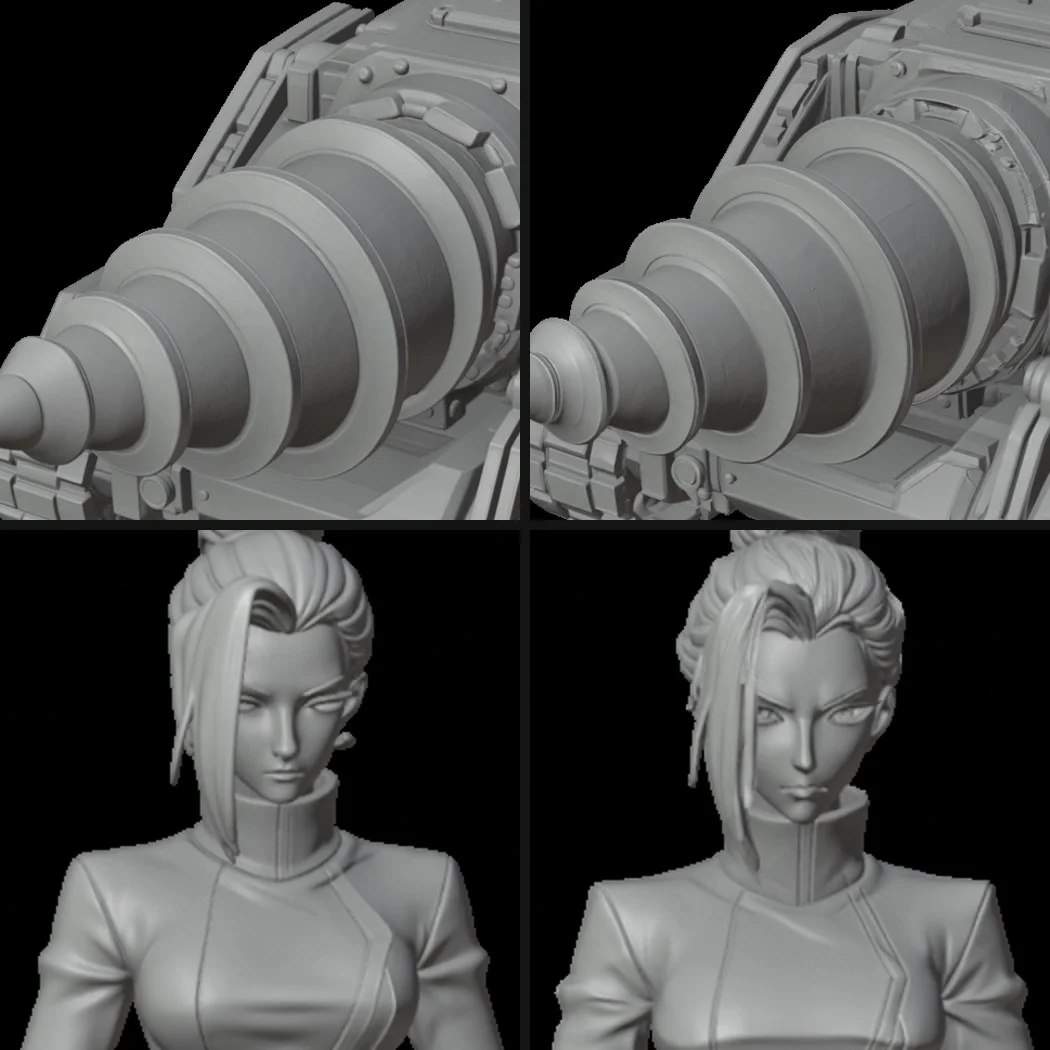
Hitem3D Quality vs Master
Master raises Hitem3D from 2M to 5M faces and takes about twice as long. It ran on the character and the tractor only, so it sits outside the grid.
At grid size the two look the same. In full-size clay close-ups Master carves busier mechanics around the drill collar, sharper eyelids and more hair strands. The drill tip comes out slightly flatter.
- Faces
- 2M · 5M
- Time per mesh
- 7 · 15 to 18 min
Mesh sheet
How to read it
Textured shows each model as delivered, with its colour, roughness, metal and normal maps, under the same studio light.
Clay drops every texture, normal maps included, so only the real geometry is left. Detail that disappears here was painted on.
Wireframe draws every triangle edge. Each view starts at the angle that best matches the source picture, found by comparing silhouettes.
Shape match is the overlap between the mesh silhouette and the subject in the picture, from that best angle: 1.00 would be a perfect match.
What was changed for the browser
Settings
Benchmark your own picture
The agent skill runs the same test on any picture through Scenario MCP: pick the models, price the run, generate, then render every mesh from the angle that best matches the picture.