
AI Virtual Try-On: Dress Any Person or Character in Any Outfit From Reference Images
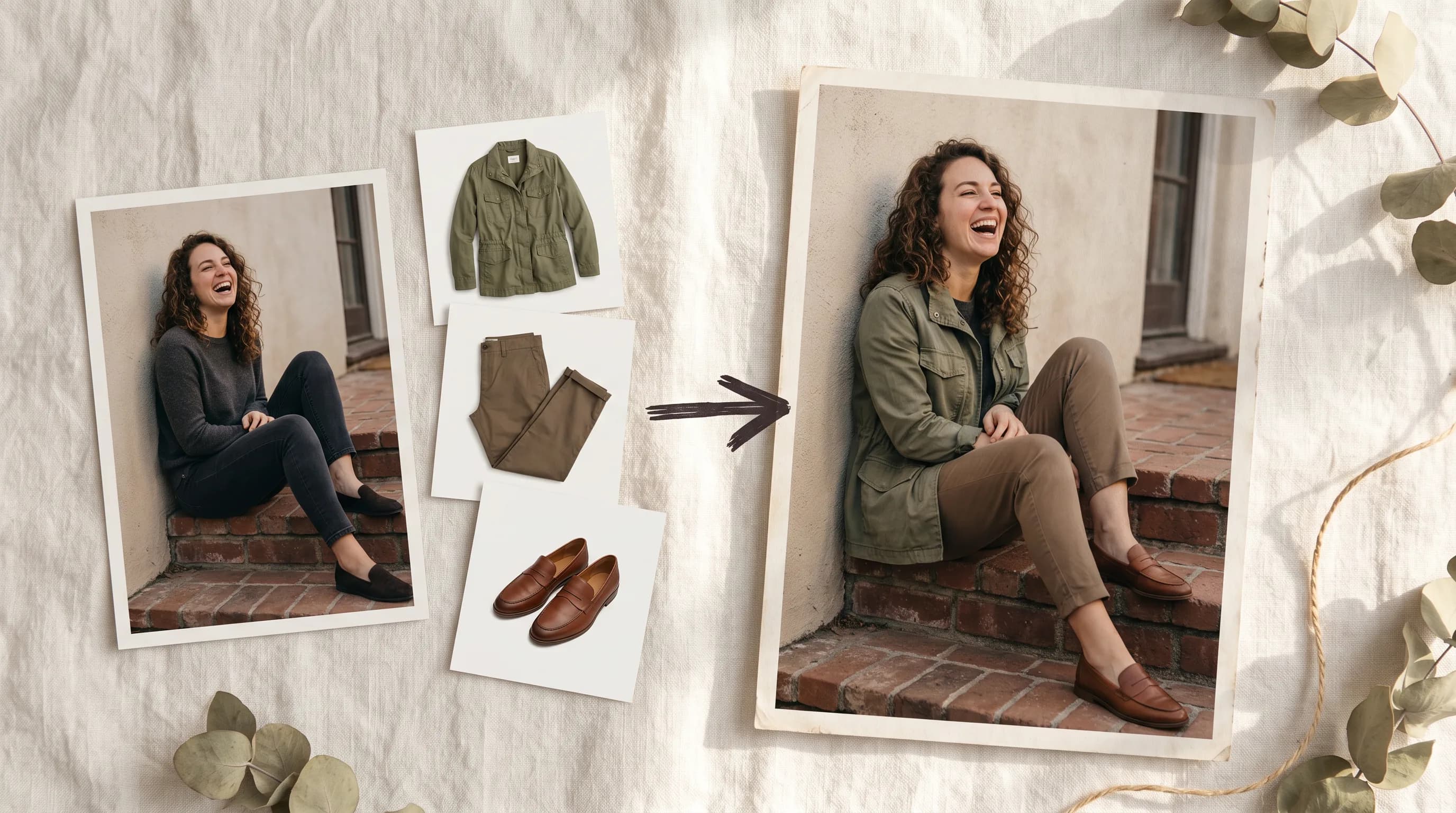
Getting a specific outfit onto a specific character has always meant either a photo shoot or a manual compositing pass. P-Image Try-On takes a person image and up to 11 separate garment references and composites a believable layered outfit while keeping identity and art style intact.
Fashion shoot budgets are built around a simple problem: to see how a garment looks on a person, you need the person, the garment, and a photographer in the same room at the same time.
For e-commerce teams with hundreds of SKUs, game developers outfitting entire character rosters, and fashion brands building lookbooks from individual product assets, that equation does not scale.
P-Image Try-On by Pruna AI takes a different approach. Upload a photo of the subject. Upload the garment images, one per item. The model composites a complete outfit onto the person while keeping identity, scene, and art style intact. No shoot. No green screen. No compositing pass.
What It Actually Does
P-Image Try-On reads each garment reference and dresses the subject in a complete layered look. It handles the full outfit stack: top, bottom, outerwear, shoes, accessories. Each item is composited with correct fit, drape, lighting, and layering relative to the other pieces.
The distinction from general image editing models is that this is a structured pipeline built specifically for the "put these exact garments on this person" problem. It is not a prompt-based wardrobe change. It is garment-to-person compositing from specific reference images, with each piece treated as a separate input rather than a described concept.
It works on real photography and on illustrated subjects: anime characters, watercolor-illustrated characters, low-poly game assets, fantasy characters. The same pipeline that dresses a brand model in a product catalog outfit dresses a game character in four separate armor pieces.
How to Get the Best Results
One garment image per item
Split the outfit into individual uploads: shirt, pants, jacket, shoes, bag as separate files rather than one collage image. The model reads each reference independently, which produces more accurate compositing on each piece.
Name every piece in the prompt
For flat-lay or product-shot garments, a prompt that names each item and its layering order makes the biggest difference to output quality. "The white blouse, the charcoal blazer over it, the charcoal trousers, and the nude heeled loafers." Mirror the structure: item, then its relationship to the piece below or above it.
For garment images that are already worn on a model, the prompt can be shorter or omitted entirely. The model reads the worn reference and composites it directly.
Use pose control for stance-specific looks
An optional pose reference image repositions the body before garments are applied. When an outfit reads differently standing, walking, or in a dynamic pose, pass a pose photo and open the prompt with "Repose her to match the pose reference, then dress her faithfully in exactly these items as shown." The model re-poses first, then applies the outfit.
Match art style in the prompt for illustrated characters
For non-photorealistic subjects, naming the art style in the prompt keeps garment textures consistent with the source character. "Anime character," "watercolor-illustrated character," "low-poly character": these cues tell the model how the garments should be rendered to match the existing visual style rather than defaulting to photorealistic fabric.
Where This Gets Used
E-commerce and product catalogs
Preview how individual SKU photos look on a brand model or a shopper photo without a physical shoot. A shirt, a pair of trousers, a jacket, and shoes as four separate flat-lay product images become a complete styled look on a specific subject. For teams managing large catalogs, this replaces individual shoot sessions for every outfit combination.
Fashion marketing and lookbooks
Build full looks from individual product assets for lookbook pages, PDP galleries, and social content. The same set of garment references can be combined in different configurations on different subjects without returning to the studio.
Games and character outfitting
Outfit illustrated heroes, anime casts, and low-poly avatars from discrete costume and armor reference images. A game character that needs multiple skin variants, seasonal outfits, or battle pass cosmetics can be dressed in each variant from reference images of the individual pieces. The model keeps the character's identity and art style consistent across every combination.
Editorial and costume design
Layer elaborate pieces: formal wear, fantasy armor, cultural dress, cosplay costumes with explicit prompt control over the stacking order. For character design work that involves complex multi-piece outfits, P-Image Try-On handles the compositing work that would otherwise require a skilled digital artist.
What to Keep in Mind
P-Image Try-On is an image-to-image pipeline. It needs a person image and at least one garment image. There is no text-only mode: you cannot describe an outfit and generate it from scratch without reference images.
The model dresses the subject you provide. It preserves identity from the person image and does not swap faces or generate a new person from a text description.
For seated poses, heavy occlusion, or cropped photos, a cleaner full-body person image and a matching pose reference produce more accurate results on shoes and hems.
Try P-Image Try-On on Scenario
FAQ
How many garment images can I upload?
The schema supports up to 11. Up to 6 is the practical sweet spot for layered outfits. More references increase fidelity on complex looks but also increase processing cost.
Does it work with illustrated and game characters?
Yes. P-Image Try-On works with real photography, anime characters, watercolor-illustrated characters, low-poly game assets, and fantasy characters. Name the art style in the prompt to keep garment textures consistent with the source character's visual style.
What is the pose reference for?
An optional image that repositions the body before garments are applied. Use it when the outfit should be seen in a specific stance: walking, dynamic pose, seated. Open the prompt with a repose instruction before the dressing instruction.
Do I need a prompt?
For garment images that are already worn on a model, the prompt is optional. For flat-lay or product-shot garments, a prompt naming each item and its layering order significantly improves output accuracy.
Can it handle accessories?
Yes. Bags, shoes, and accessories can be uploaded as separate garment reference images alongside clothing pieces.