
Keep the Shot. Swap the Character. P-Video Replace Just Changed How Video Production Works.
You have a video. You want a different character in it. P-Video Replace replaces the on-screen character with any reference image while leaving the background, lighting, camera motion, and audio exactly as they are. Only the character changes.
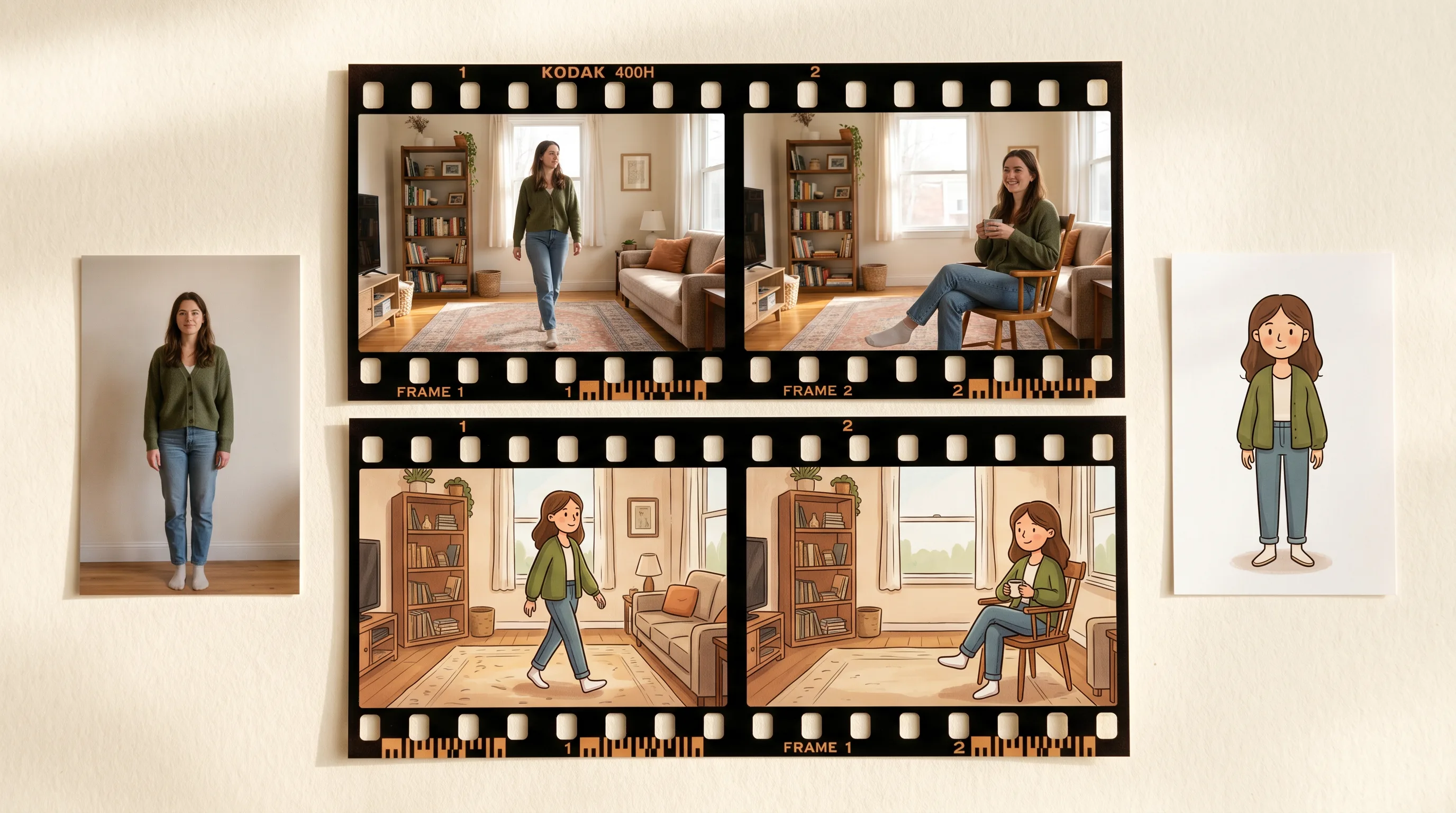
The problem that usually comes up constantly in game development and content production is that you have footage that works, but the character in it is wrong.
A reference video with the exact motion you need, but performed by a stand-in rather than your actual character. A cinematic with the right camera work and lighting, but a placeholder character from an earlier build. A product video with a real performer whose likeness you cannot use. A motion reference shot in the studio that needs to become your game asset before it goes into the engine.
The traditional answer is reshoot or roto: either film it again with the right character, or painstakingly remove and replace the subject frame by frame. Both are expensive. Both are slow.
With P-Video Replace on Scenario - the fastest and most affordable character replacement model so far - you can now upload the source video and one to four reference images of your replacement character, the model then replaces the on-screen character while leaving the background, lighting, camera motion, and audio exactly as they are. Only the character changes.
What It Actually Does
P-Video Replace reads the full-body posture and spatial placement of the character in each frame of the source video. It then composites the reference character into that position across the whole clip, maintaining visual consistency with the scene around it.
This is not a face swap. The model handles the full body: posture, positioning, scale, and movement through the frame. The replacement character inherits the motion and spatial logic of the original while being rendered in its own visual style.
It works with game assets, illustrated characters, stylized avatars, and photorealistic characters. The background, lighting quality, camera movement, and audio from the source video all carry through unchanged into the output.
Getting the Best Results
Match the reference image to the first frame
Extract the first frame of your source video. Use it as the reference for how your replacement character should be posed and framed in the still image you upload. Character in the same position, facing the same direction, similar proportions in frame. The closer the initial framing matches the source video's opening, the more stable and consistent the replacement will be throughout the clip.
You can generate this matched pose directly in Scenario. Take the first frame, upload it as a reference image into any image generation model, describe the character you want in the same pose, and generate. Feed that output into P-Video Replace as your reference image.
Use multiple reference angles for complex movement
When the character moves significantly throughout the video, turning, changing orientation, moving toward or away from camera, provide two to four reference images from different angles. Multiple angle references give the model more to work with when the character's spatial orientation changes across the clip.
Instruction Prompt for placement details
The optional text field lets you specify clothing details, expressions, or spatial context not captured in the reference images. If the replacement character has specific design elements that need to come through consistently, or if the scene context requires a particular framing, describe it here.
Where This Fits in a Production Pipeline
Game development: motion reference to final character
Film a performer doing the movement you need. Use P-Video Replace to swap the performer with your game character. The background of the reference footage does not matter because it is replaced along with the character. What matters is the quality of the motion. Shoot for motion, replace for character.
Placeholder character to final asset
A common situation in game production: a cinematic is built and lit with a placeholder character from an earlier build, or a grey-boxed proxy. The final character design comes in late. P-Video Replace drops the final character into the existing footage without rebuilding the scene.
Localization and character variants
A game with regional character variants, different skins for the same character, or alternate hero designs for different markets can use P-Video Replace to adapt existing cinematics and trailers without reshooting. Same footage, different character reference, different output.
P-Video Replace vs P-Video Animate
Both models deal with character animation but they approach it differently.
P-Video Animate transfers motion from a source video onto a still character image. The source video provides the movement. The output is the character performing that movement, generated fresh.
P-Video Replace replaces the character in an existing video while preserving everything else: the background, lighting, camera motion, audio. The source video is the final output environment. Only the character changes.
Use P-Video Animate when you want a character to perform a motion and you are generating the output from scratch. Use P-Video Replace when you have a video that already works and you need a different character in it.
Try P-Video Replace on Scenario
FAQ
What is the file size limit for source video? 10MB. For longer or higher resolution source footage, use P-Video Animate which accepts up to 100MB.
How many reference images can I upload? One to four. For videos where the character moves significantly and changes orientation throughout the clip, providing multiple reference angles produces more consistent results.
Does it preserve the audio from the source video? Yes by default. Toggle Save Audio off for a silent output.
What output resolution is available? 720p or 1080p. Default is 1080p.
What FPS options are available? Original, 24, or 48 FPS.
How is P-Video Replace different from P-Video Animate? P-Video Replace swaps the character in an existing video while keeping background, lighting, and audio intact. P-Video Animate transfers motion from a source video onto a still character image and generates the output fresh. Use Replace when the video environment is final. Use Animate when you are generating the output from scratch.
Does it work with stylized and illustrated characters? Yes. P-Video Replace works with game assets, illustrated characters, stylized avatars, and photorealistic characters. The replacement adapts to the visual style of the reference images.
Related models
P-Video 2 Pro
P-Video 2 Pro generates video from a text prompt or first/last reference frames, with native dialogue, music and sound effects, up to 15s at 480p or 768p, in Speed or Quality mode.
P-Video 2
P-Video 2 generates videos from a text prompt, an image or an audio track, with native audio (dialogue, music, sound effects), improved lip sync and sharper on-screen text.
P-Video Edit
P-Video Edit by Pruna AI edits an existing video from a text prompt, optionally guided by up to four reference images for identity or style. Draft mode for fast, low-cost previews.