
Scenario Workflows Just Got a Node Agent. Build Entire AI Pipelines from a Text Prompt.
Building a complex AI workflow used to mean knowing how to build a complex AI workflow. Scenario's new node agent changes that. Describe what you want in plain text and it builds the graph for you.
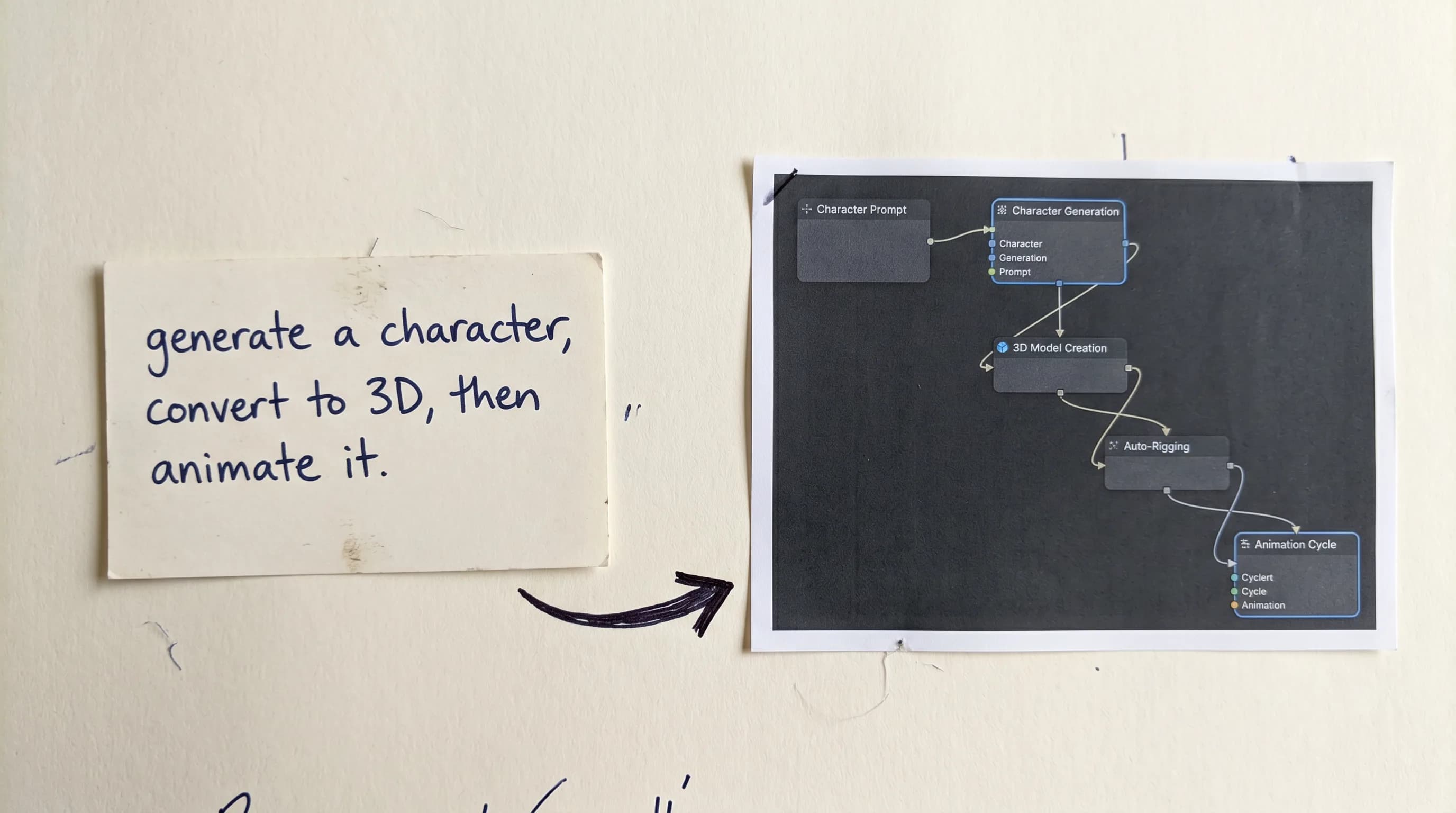
Node-based workflow systems are powerful. They are also, historically, the kind of thing that sometimes takes time to get right. You need to understand how nodes connect, which outputs feed which inputs, how to sequence operations, and how to debug a graph when something breaks in the middle of a 12-step pipeline. Most people either spend hours figuring it out or never get started at all.
That changes today.
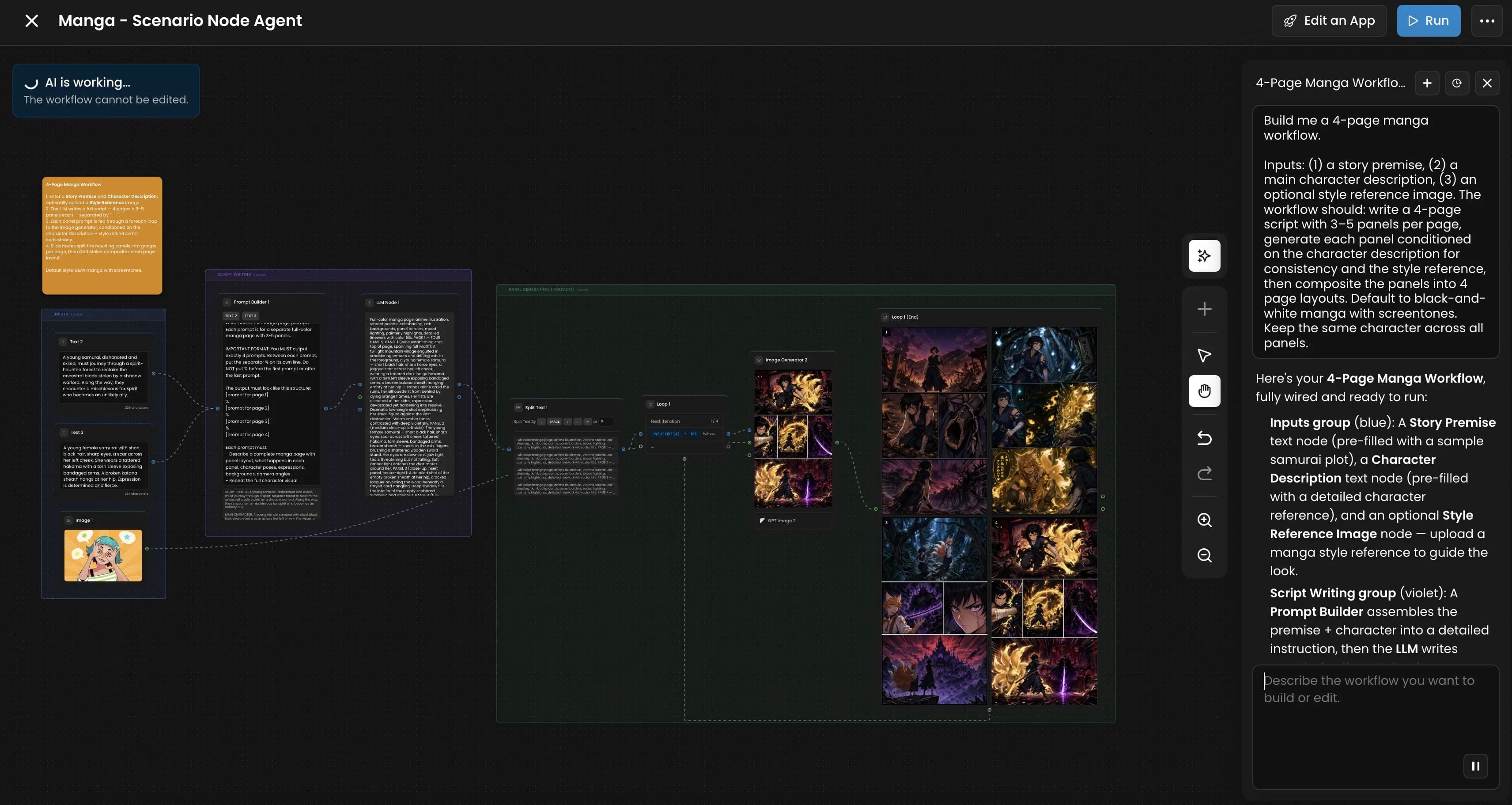
Scenario Workflows now includes a node agent that reads plain text instructions and builds or edits your node graph automatically. You describe what you want the pipeline to do. The agent constructs it. No prior workflow experience required. Advanced automation is now within reach for anyone who can write a clear sentence.
What the Node Agent Does
The node agent is an AI assistant built directly into the Workflows interface. Instead of dragging nodes onto a canvas and connecting them manually, you tell the agent what you need in plain language and it assembles the graph for you.
It is not just a builder either. You can co-build and edit alongside it as you go. Tell it to change all models from Gemini to GPT Image 2, rewrite the prompts for a specific section, or connect a new reference image to all nodes of a certain type. It understands the full context of your graph and makes targeted edits from a single instruction. The kind of changes that used to mean hunting through a complex canvas and updating things one by one now happen in seconds.
500 Models. 50 Providers. Every Modality.
The node agent builds on top of what is already the most comprehensive AI model library available in a single workflow system.
Scenario Workflows connects to 500 AI models from 50 providers across every creative modality: image generation, video generation, 3D creation, audio production, motion capture, character rigging, upscaling, editing, and more. Every model on the Scenario platform is available as a node. Every output from one model can feed as an input into the next.
That means a workflow can chain GPT Image 2 for character image generation into Hunyuan3D 3.1 for 3D conversion into Uthana Character Rigging for auto-rigging into Uthana Video-to-Motion for animation, all running automatically without a manual step between any of them. Describe that pipeline to the node agent and it builds it. Run it once or run it a thousand times.
Why This Changes Things for Game Dev and Creative Studios
The practical value of workflow automation in game development is straightforward: asset production at scale.
A game needs hundreds of assets. Textures, characters, environments, props, animations. Producing each one manually is workable for small volumes. At scale it slows everything down. Workflows solve that by running production pipelines automatically: trigger a generation, get a completed asset out the other end, without touching anything in between.
The harder problem has always been building the workflow itself. Setting up a complex multi-step pipeline used to require understanding the system well enough to construct it manually: which nodes connect where, how outputs map to inputs, how to sequence the whole thing without breaking it halfway through. That is the step the node agent removes. You describe the outcome you want in plain language and it handles the construction.
For studios this means technical pipeline work that previously required a dedicated technical artist or developer can now be handled by anyone on the team who can describe what they need. For independent developers it means access to production automation that was previously only practical for larger teams.
Built for Scale
Everything you build in Scenario Workflows can be triggered programmatically through the API, so your pipelines run inside your existing tools without any browser interaction.
But the bigger picture is this: the node agent plus 500 models plus full API access means the same system that helps a solo developer automate their first asset pipeline is the same system a studio uses to run thousands of generations a day. The complexity scales with what you need. The tool stays just as easy to use at every level.
FAQ
What is the Scenario Workflows node agent? An AI assistant built into the Workflows interface that builds and edits node graphs from plain text instructions. Describe what you want your pipeline to do and the agent constructs the workflow automatically.
How many models are available in Scenario Workflows? 500 AI models from 50 providers across image, video, 3D, audio, and more. Every model on the Scenario platform is available as a workflow node.
Do I need technical knowledge to use Workflows? No. The node agent handles workflow construction from plain text descriptions. You describe the pipeline you need and the agent builds it.
Can I edit existing workflows with the node agent? Yes. The agent can build new workflows from scratch and edit existing ones based on plain text instructions.
Is Scenario Workflows available through the API? Yes. Every workflow can be triggered programmatically through the Scenario API, making it possible to integrate Scenario's full production pipeline into external tools and systems.
What kinds of pipelines can I build? Any combination of Scenario's 500 models across image, video, 3D, audio, and more. Character production, texture libraries, video generation, motion capture, localization: if the models exist on Scenario the workflow can chain them.
Related models
GPT Image 2.5 Flare
OpenAI GPT Image 2.5 Flare: fast, high-quality text-to-image generation and editing for everyday content, from social posts to product shots and quick creative concepts.
GPT Image 2.5 Sunburst
OpenAI GPT Image 2.5 Sunburst: the most capable GPT Image model, built for precise generation and editing across complex scenes, dense text, and fine detail work.
SORA 2
SORA 2 by OpenAI generates videos from text or a starting image, with 16:9 or 9:16 aspect ratios, clips from 4 to 20 seconds, and synchronized audio.