
Stop Running Your AI Workflow One Prompt at a Time. That's What Loops Are For.
Workflow automation loops eliminate the tedious copy-paste cycle that wastes hours on repetitive tasks. Instead of manually running the same prompt fifteen times with different inputs, loops process entire lists in a single run. Discover how one feature transforms batch work from painful grind to instant results.

There's a very specific kind of pain that anyone who's built AI workflows knows well. You have a prompt that works. The output looks great. And then you realize you need to run it fifteen more times with slightly different inputs.
So you do what everyone does. You change the text, hit run, wait, change the text again, hit run again. Fifteen times. For what is essentially the same job.
Loops exist because that workflow is, frankly, an unnecessary waste of your time.
What actually happens when you use a Loop
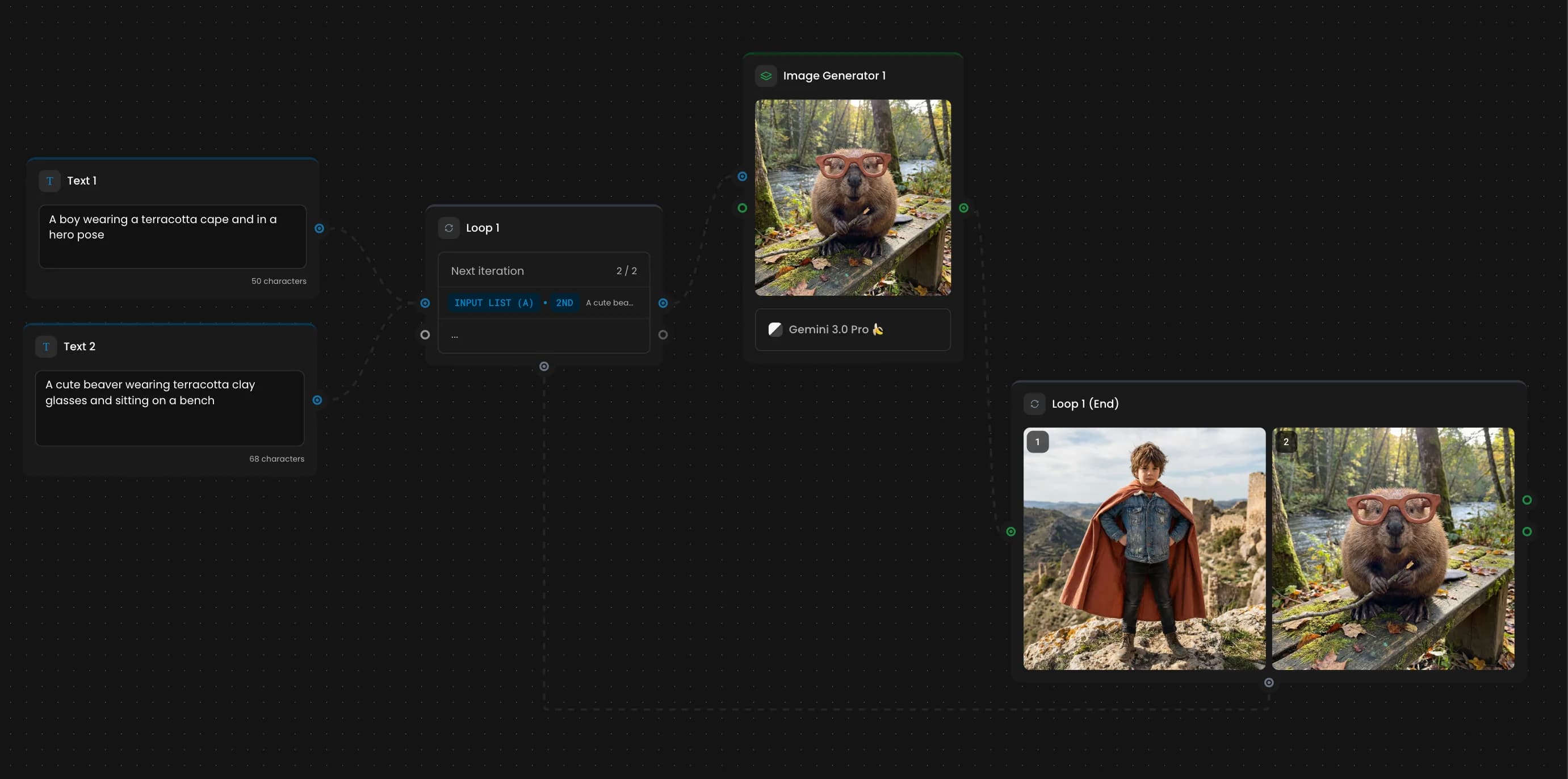
Loops is a node that contains its own mini pipeline. You build your generation or editing logic inside it, connect a list of inputs (images, prompts, or assets), and it runs that internal pipeline once for every item in the list. One run, full batch of results out the other end, automatically and back to back.
Write your prompts: "A boy in a hero cape. A beaver wearing glasses." Drop in a Loop node and an image generator. By the time you've looked at the first result, the rest are already done.
It works the same way with images and video. Connect a set of reference images, character sprites, or product shots, and the Loop runs each one through the same pipeline with the same model, the same settings, the same logic, applied to every asset in the set without you touching anything.
A batch of character portraits, a collection of product shots, a full set of background references: one run, everything processed.
The scenario where this clicks
Say you're producing ad creatives for a fashion drop. Ten colorways, all needing their own visual, all due by end of day. The old version of this job is a grind. The Loop version is: write the list, run once, review ten outputs, ship.
Or you're a growth team testing hooks. You have six different opening lines you want to visualize. Type them all in one box, split by line break, loop through an image or video generator. Six variations in one run. You're testing at a pace that wasn't really possible before without a dedicated production team behind you.
Or you're a game studio running a batch of character references through a style pipeline. Drop the images into a Loop, connect them to your generator, run once. Every character comes out the other side, processed and consistent.
That's the kind of update that doesn't look impressive when you're just reading about it but completely changes your day-to-day when you actually use it.
Frequently asked questions
What is a Loop in Scenario Workflows? A Loop is a Workflow node that takes a list of inputs and runs your generation pipeline once for each item automatically. It works with both text inputs and image inputs. The Loop End node collects every output when it's done and passes the full set downstream.
Can I loop over images as well as text? Yes. Loops accept image inputs as well as text. Connect a set of images into a Loop and the pipeline runs once per image, applying the same model and settings to each one automatically.
How do I get a list of items into a Loop? For text, type your full list into a single Text node, pass it through the Split Text utility node to break it into individual items, and connect that into the Loop. The Split Text node supports splitting by comma, space, line break, and other separators. For images, connect your image inputs directly into the Loop node.
Does every iteration use the same model and settings? Yes. The pipeline inside the Loop stays fixed across every iteration. The model, the settings, and the structure don't change. The only variable is the input item from your list, which is what makes Loops reliable for generating consistent sets at scale.
Where do my outputs go when the Loop finishes? The Loop End node collects all outputs from every iteration and makes them available as a set for any downstream nodes in your Workflow.