
How to Turn Any Image Into a 3D Model with AI in 2026 | Tripo on Scenario
Turning a 2D image into a game-ready 3D model has always meant days of modeling, texturing, and cleanup. Tripo 3.1 on Scenario does it from a single (or multi) image with the production controls that actually matter: HD quality, Smart Low Poly optimization, PBR textures, and quad mesh topology.
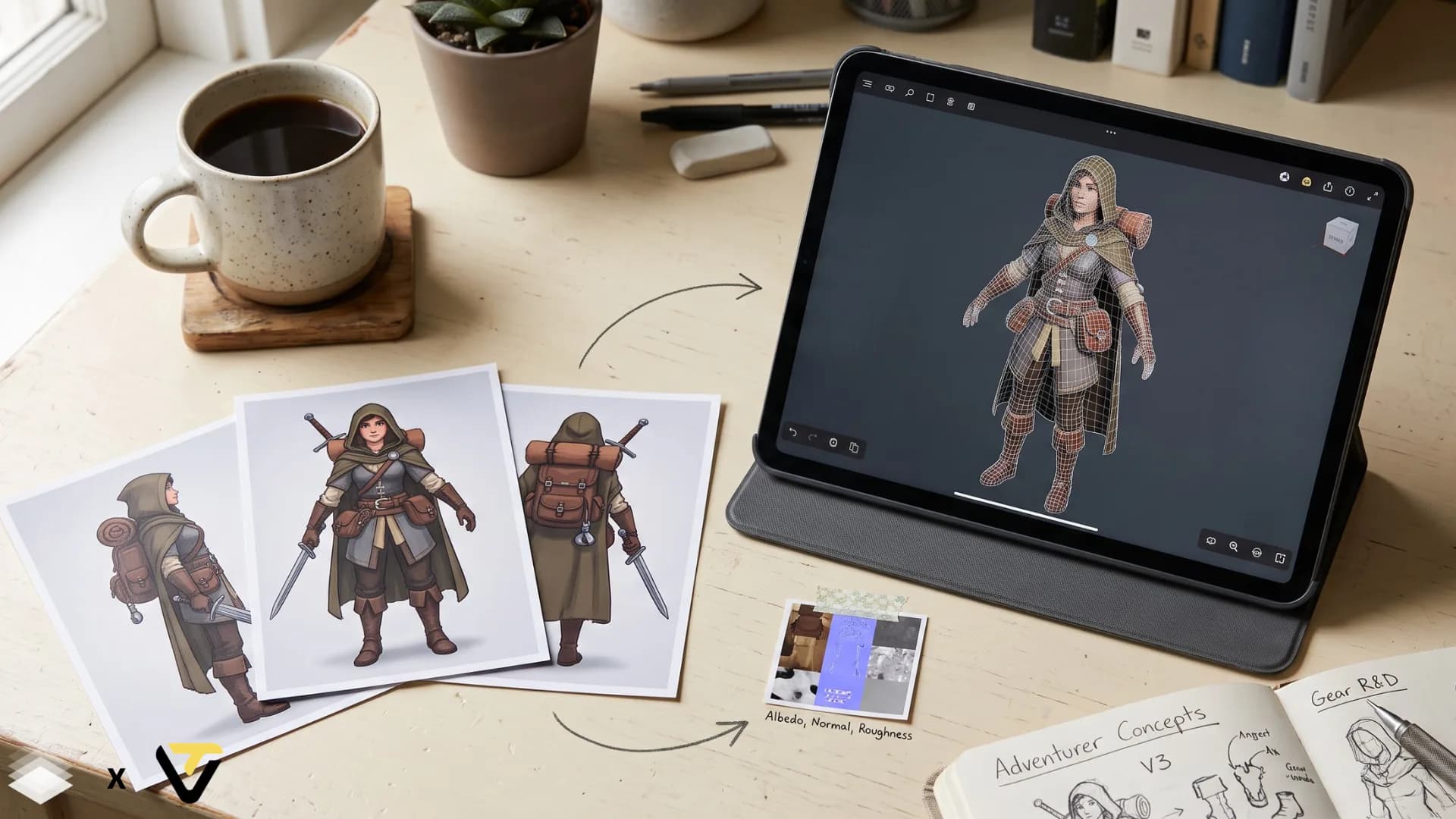
The idea of going from a 2D image to a finished game-ready asset is simple enough to describe. The execution is what breaks timelines. Modeling takes days. Getting topology clean enough for animation takes more. Texturing, retopology, rigging: every step is its own specialist skill and its own production bottleneck. For large studios this is absorbed across a team. For indie developers and small studios, it is the part that determines what is actually possible to ship.
The team behind Tripo has become one of the most active in AI 3D generation, and their models are now a reference point for image-to-3D quality: geometry that holds up in an engine, textures that respond to real lighting, and topology clean enough to animate. Each new release has pushed the output closer to something a production team can actually use rather than just preview.
Tripo 3.1 and Tripo 3.1 Multi View, both available natively on Scenario, run the whole thing from a single image or text prompt. Not as a black box that spits out a mediocre result, but as models with the level of control that production work actually requires. Here is what both do, and when to use each one.
A Real Pipeline: One Character, Start to Finish
Here is what this looks like in practice for a small indie team.
The concept artist finishes a painted front view of the main character. Since this is a hero asset, the team generates the left, back, and right views directly in Scenario with an image editing model, then drops all four into Tripo 3.1 Multi View with Texture level set to Extreme, Geometry quality set to Detailed, and Smart Low Poly enabled. The result is a mesh grounded in reference from every side, kept inside the engine's polygon budget, with the full PBR map set ready for Unity or Unreal.
For the game's four-legged creature companion, the same flow ends with Tripo Rigging v2.5, which specializes in non-biped skeletons. Preset animations verify the rig, and the exported model arrives in the engine already weighted and ready to move.
A pipeline that normally spans modeling, texturing, retopology, and rigging collapses into something one artist can run in an afternoon.
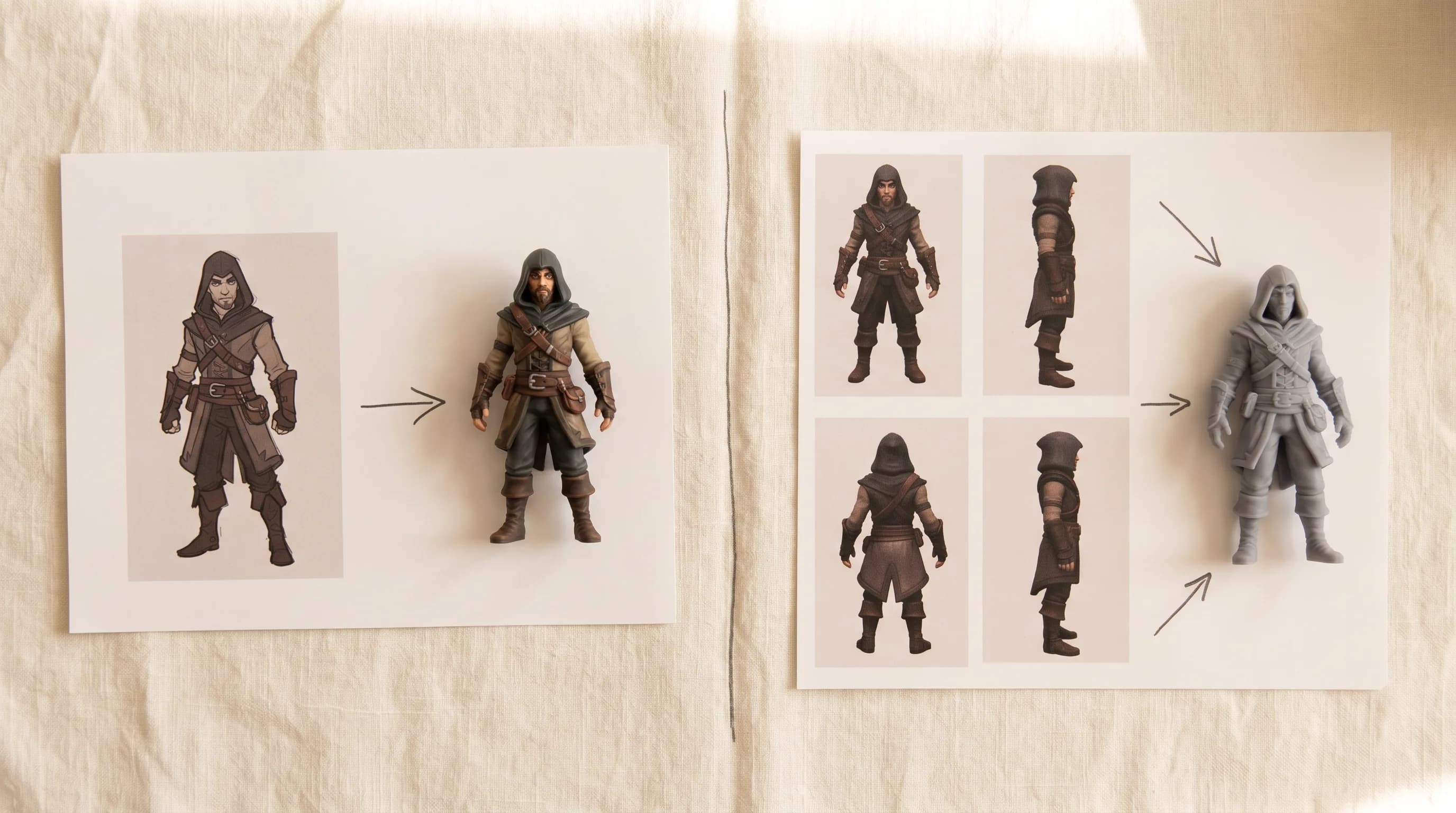
Tripo 3.1: The Starting Point for Most 3D Work
Drop in a single image or a text prompt and Tripo 3.1 generates a fully textured 3D mesh.
What makes it useful for real production work rather than just demos is the level of control you have over the output. HD quality mode produces geometry and textures that hold up in an actual engine, not just a preview renderer. Smart Low Poly automatically optimizes the mesh so you are not importing a dense, unworkable triangle soup into Unity or Unreal. Quad mesh topology outputs clean geometry that deforms correctly when animated. PBR textures give you the full map set your engine needs to render the material under dynamic lighting.
The reason these settings matter is that most AI 3D generators produce outputs that look right in a screenshot and fall apart the moment you bring them into a production pipeline. A mesh with no topology control, no optimization, and textures that are not PBR-mapped is not a production asset. It is a preview. Tripo 3.1 with the right settings enabled is the difference between something you can actually ship and something you would have to rebuild from scratch.
It is the right model for props, environmental objects, stylized characters, and anything where a single clear reference image gives the model enough to work with. Fast iteration, solid output, and controls that give you the technical precision you need for real game development.
Tripo 3.1 Multi View: For When Every Side Matters
Tripo 3.1 Multi View solves a specific problem that anyone who has used single-image 3D generation has run into: the back of the model looks like a guess.
When you give a 3D generator one image, it can only work with what it can see. The front of the character is grounded in your reference. The sides and back are inferred. For simple props and environmental assets that inference is usually fine. For a hero character that players will see from every angle, it is not.
Multi View takes four reference images: front, left, back, right. It processes all four simultaneously and generates a mesh that is grounded in actual reference from every direction.
The model still makes judgment calls, but they are grounded in real reference rather than guesswork. Proportions hold. The back of the head matches the front, or comes close enough that cleanup is minutes instead of hours.
The extra work is preparing those four reference images. For hero characters and complex assets that will be prominent in the game, that preparation is worth it. The output is structurally accurate all the way around, which means less cleanup time and a model that actually matches the original design from every camera angle.
Same HD quality, Smart Low Poly, PBR texture, and quad mesh controls as Tripo 3.1. The four-image input is the only meaningful difference in the workflow, and it is the difference between a production-ready hero asset and one that needs significant manual cleanup.
Getting the four views does not necessarily mean a separate photo shoot or a full turnaround illustration. If you already have a front-facing concept, you can generate the remaining angles directly in Scenario. Upload your reference image into any image generation/editing model or directly on Edit with prompts, describe the angle you need ("same character, side view, neutral pose, same style and proportions"), and generate the additional views from there. GPT Image 2 handles this particularly well.
Who Builds These Models
Tripo 3.1 and Multi View are built by Tripo, the team whose releases have shaped much of what image-to-3D generation can do today. Their own platform, Tripo Studio, pairs generation with the tools that follow it: mesh segmentation and editing, retopology, texture refinement, and auto-rigging.
Which One to Use
Tripo 3.1 is the right call for the majority of assets: props, environmental objects, secondary characters, anything where a single clean reference image covers what you need. It is faster, the workflow is simpler, and the output quality with HD and Smart Low Poly enabled is genuinely strong for production use.
Tripo 3.1 Multi View is worth the extra setup for hero characters and any asset that players will see from multiple angles throughout the game. Prepare four reference images, run Multi View, and the structural accuracy you get back removes the cleanup work that would otherwise follow a single-image generation.
Start with Tripo 3.1. Move to Multi View when the asset warrants it.
FAQ
What is the difference between Tripo 3.1 and Tripo 3.1 Multi View? Tripo 3.1 generates a 3D mesh from a single image or text prompt. Tripo 3.1 Multi View takes four reference images: front, left, back, right. Multi View eliminates guesswork on surfaces the single-image model cannot see, producing structurally accurate geometry all the way around. Use Multi View for hero characters and any asset players will see from multiple angles.
Does Tripo 3.1 generate PBR textures? Yes. The full PBR map set: albedo, normal, metallic, roughness. Ready to import into Unity, Unreal, Godot, or any engine that uses PBR materials.
What is quad mesh topology and why does it matter? Quad mesh outputs faces as four-sided polygons rather than triangles. Quad-based geometry deforms more cleanly during animation and is the standard format for production pipelines in Maya, Blender, and most game engines.
Related models
Tripo P2
Tripo P2.0 production-grade native 3D diffusion model. Generates engine-ready assets with clean topology, optional quad mesh output, and face counts up to 50,000.
Tripo P2 Multi View
Tripo P2.0 Multiview (front + left/back/right) to 3D model. Production-grade native 3D diffusion with clean topology, optional quad mesh, and face counts up to 50,000.
Tripo P2 Text to 3D
Tripo P2.0 text to 3D. Production-grade native 3D diffusion with clean topology, optional quad mesh output, and face counts up to 50,000.