
Your 3D Model Just Became a Set of Editable Parts. Meet Tripo Segmentation on Scenario.
Getting a 3D model ready for rigging or part-based texturing has always meant manual work in a DCC: selecting geometry, separating meshes, cleaning up boundaries. Tripo Segmentation does it automatically. Upload a mesh, get back editable parts.
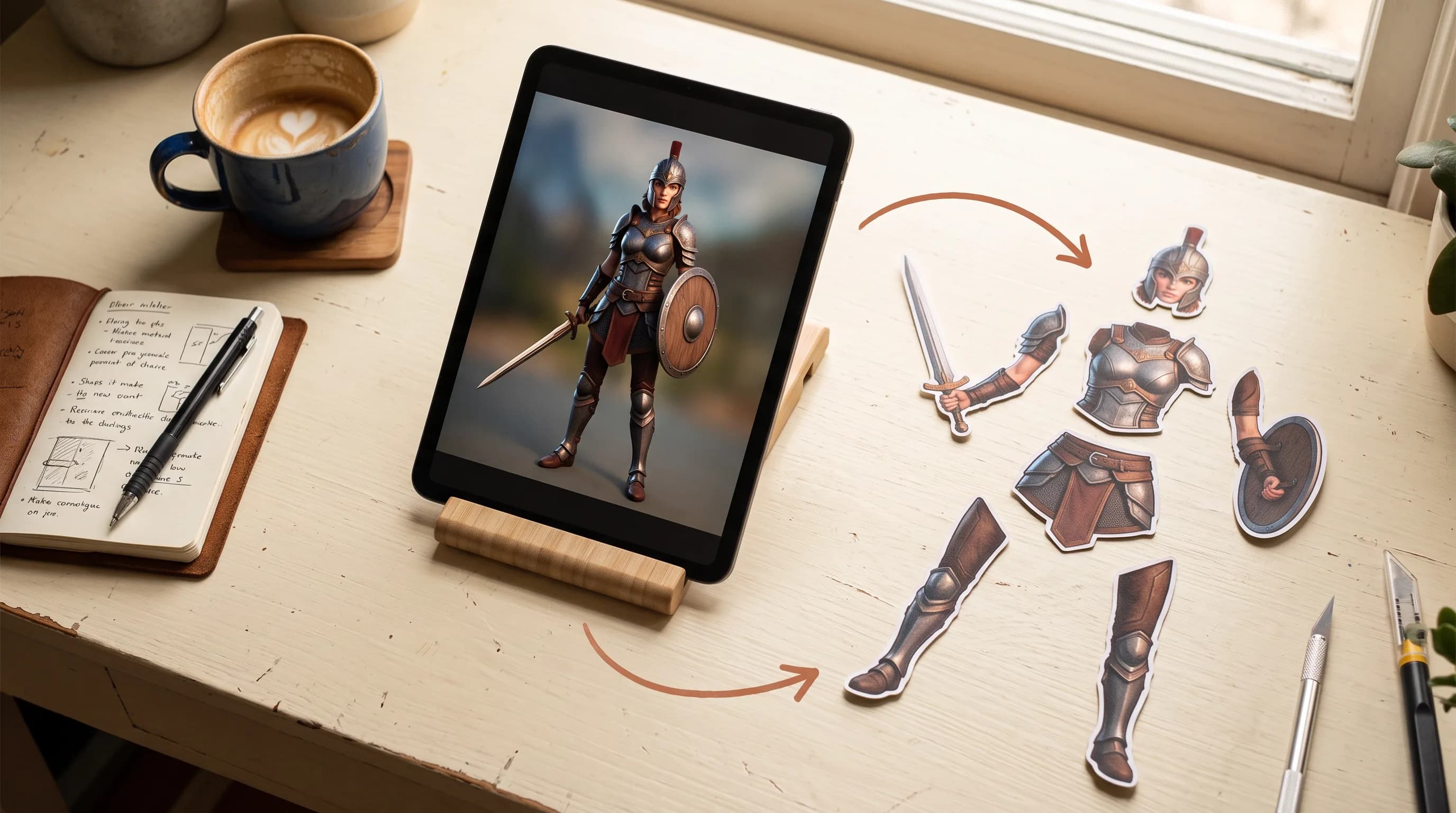
Splitting a mesh into parts: the step in almost every 3D production pipeline that nobody talks about enough because it is unglamorous and time-consuming.
You have a character model. Before you can rig it properly, you need the arms separated from the torso, the head from the neck, the accessories from the base mesh. Before you can texture it by zone, you need the parts isolated. Before you can customize it, modify a specific piece, or send individual components to a 3D printer, you need the mesh broken apart at its natural seams.
Doing this manually in a DCC is exactly the kind of work that eats hours without producing anything creatively meaningful. Select geometry, separate mesh, clean up boundaries, repeat for every part.
Tripo Segmentation v1 and Tripo Segmentation v2 are now on Scenario. Upload a mesh. Get back editable parts. Automatically.
Tripo Segmentation v1: Geometry-Based, No Parameters
Tripo Segmentation v1 takes an uploaded 3D mesh and divides it into individual parts using geometry-based analysis. It detects natural separation points in the topology: where limbs meet the torso, where accessories attach, where mechanical assemblies have distinct components. Each part comes back as an individually editable piece.
Upload a model up to 150 MB. The model analyzes the geometry, finds the natural split points, and returns a segmented mesh.
The geometry-based approach works well for most standard use cases: character models with clear anatomical structure, hard-surface props with distinct mechanical components, game assets where the topology already follows the part boundaries. The model reads what is already in the geometry and uses it.
Tripo Segmentation v2: Semantic Analysis, Sharper Boundaries
Tripo Segmentation v2 takes a different approach. Instead of reading geometry alone, it uses semantic analysis to understand what each part of the model is and where its boundaries should logically fall. The result is sharper, cleaner part boundaries than geometry-only splitting, particularly on complex models where the topology does not perfectly follow the part structure.
Three settings control the output:
Simple: fewer, larger parts. Good for broad structural separation where you need the main body sections without fine detail. A character split into head, torso, arms, and legs rather than every individual component.
Balanced: the middle ground. Meaningful separation without over-fragmenting the mesh. Most production use cases land here.
Detailed: maximum granularity. Every distinct component gets its own part. For complex mechanical assemblies, layered armor, or any model where fine-grained part separation matters, Detailed surfaces every segmentable piece.
Split By Connectivity controls whether disconnected pieces within the same logical part stay together or get separated. Useful for models where components share a semantic role but are physically distinct in the mesh.
Reference image guidance overrides the granularity setting and uses a reference image to guide how the model is split. For models where the semantic analysis needs direction, or where a specific part breakdown is required that does not match the default output, the reference image gives the model a concrete target to work toward.
What You Can Do With a Segmented Mesh
Both models exist for the same reason: almost everything downstream of modeling gets easier when the mesh is already in parts.
Rigging prep. Separated limbs and body parts are the prerequisite for clean skeletal rigging. Getting them isolated automatically before the rig pass removes the most tedious manual step in the character pipeline.
Part-based texturing. Texturing a character or prop by zone is significantly cleaner when the zones are already separated. Each part gets its own UV space and texture treatment without manual masking.
Model customization. A character with individually separated armor pieces, clothing items, and accessories is a character you can customize. Swap the helmet. Change the weapon. Modify the shoulder pad. Each piece is independently editable once the mesh is segmented.
3D printing. Complex models destined for printing often need to be broken into printable components. Segmentation handles the separation automatically rather than requiring manual geometry work.
Which one should you use?
Start with v1 when you want a zero-configuration split and your model has clear structure: characters with standard anatomy, hard-surface props, assets where the topology already follows the part boundaries.
Reach for v2 when you need control over the output or the model is complex: granularity settings determine how many parts you get back, Split By Connectivity handles disconnected pieces, and a reference image lets you dictate the exact breakdown. It also produces cleaner boundaries on meshes where the topology does not follow the part structure. Keep in mind v2 is currently in preview.
Where This Fits in a 3D Production Pipeline
Both models connect directly into the broader 3D pipeline on Scenario.
Generate a character with Tripo 3.1 or Tripo 3.1 Multi View. Run it through Tripo Segmentation to split it into editable parts. Texture each part independently. Rig with Uthana Character Rigging for bipedal humanoids or Tripo Rigging v2.5 for creatures. Animate with Uthana Video-to-Motion or Uthana Text-to-Motion.
Segmentation is the step that makes every downstream operation cleaner. A rigged character deforms better when the mesh is properly separated at the joints. A textured character looks more intentional when each zone is an independent part. A customizable character is only customizable when the pieces are already split.
Try Tripo Segmentation v1
Try Tripo Segmentation v2
FAQ
What is the difference between Tripo Segmentation v1 and v2?
v1 uses geometry-based analysis to find natural split points in the topology. v2 uses semantic analysis to understand what each part of the model is, producing sharper and cleaner boundaries. v2 also adds granularity control (Simple, Balanced, Detailed), Split By Connectivity, and reference image guidance. v1 is fully stable. v2 is currently in preview.
What file size does it support?
Up to 150 MB for v1. Check the v2 model page for current size limits during preview.
Does v1 require any configuration?
No. Upload the mesh and it runs automatically with no parameters to set.
What does the reference image do in v2?
It guides how the model is split, overriding the granularity setting. Useful when the default semantic analysis needs direction or when a specific part breakdown is required.
What is Split By Connectivity in v2?
A toggle that controls whether disconnected pieces within the same logical part stay together or get separated into individual components.
What use cases is this best for?
Character rigging prep, part-based texturing, model customization, 3D printing, and modular game asset pipelines where individual components need to be independently editable.
Related models
Tripo Smart UV
Tripo Smart UV re-unwraps a 3D model into a clean, organized UV layout, bakes its textures onto it and keeps the rig intact, with a UV atlas preview on every result.
Tripo Retopology v3
Tripo Retopology v3 rebuilds dense or AI-generated meshes as clean low-poly topology, with triangle or quad output, a 500-face floor and optional Smart UV unwrap.
Tripo P2
Tripo P2.0 production-grade native 3D diffusion model. Generates engine-ready assets with clean topology, optional quad mesh output, and face counts up to 50,000 (25,000 quad).